

#1392 - Adding images from Photobucket, Flickr and Perhaps Facebook - Comments
Post
Posted
#1392 - Adding images from Photobucket, Flickr and Perhaps Facebook - Comments
This is a spacer post for a website comment topic. The content this topic relates to: #1392 - Adding images from Photobucket, Flickr and Perhaps Facebook
Posted


Moderator


This sounds more like syndication outward, which I agree is interesting :).
Posted

While making use of all that lovely free storage out there !!
For me the user experience will be key here.
As a forum user I want to be able to press a button that allows an image stored on my device to be transferred to my chosen photo storage provider and a link to it placed in my forum thread.
Devices will mainly be smart phones and tablets.
Photo storage will be Photobucket, Flickr + probably others.
Look forward to your reply
Posted
Moderator
Is it that people want to keep their photos all in one place, so they post primarily to their main photo store/album and don't bother posting it on the site?
So, you want to let them achieve both objectives at once, via your site.
When you add an attachment, it would popup the options dialogue for that attachment as normal. But, if it was an image, there'd be additional checkboxes to syndicate to various targets. The checkboxes would be greyed if the service had not yet been set up, with a 'setup' button next to it.
It seems worthwhile doing for galleries too. So, also these options on the gallery form.
Posted
We do not allow attachments at all because we would soon run out of disk space to store them. So the only way that people can put an image up is by linking to one they have stored elsewhere. We recommend Photobucket and Flickr.
The use case that you describe is spot on.
Cheers
Ade
Posted
Moderator
The quote would be:
6 hours + 5 hour per API.
So for 3 APIs... (6+5*3)*33=£693 GBP.
The 6 hours would be to modify the attachment system and interface to be able to include the setup and transfer buttons for external hosting services, sync up with the uploader properly, and be able to include remote URL references in as the attachment URLs.
Then for each API we would need to implement oAuth against it and code up against its API.
Posted
Does the cost scale down if we just went for 1 API to begin with:
(6+5)*33=£363
I am thinking Photobucket first as it is the most common one in use today.
Cheers
Ade
Posted
One point the source of the image to syndicate must work from phones, tablets and computers - is that included in your design ?
Cheers
Ade
Posted
Moderator
It would work via the user oAuth'ing their photo service such that the server can then copy the uploaded file across to the user's account on the photo service via its API (server to server). That is browser-agnostic. Essentially this just extends the existing attachment system (and gallery system to - I didn't include in the quote, but I may do it).
Note mostly for myself:
Regarding your specific situation, the system will need to be aware that you have to sync to Photobucket and that the file should not kept on your server (given the attachment quota's are zero).
Posted
Payment authorised and credits loaded.
Please can you implement.
Cheers
Ade
Posted
Moderator
I have this implemented, but not yet tested. I am waiting on Photobucket to provide an API key, as they took their developer site down early in the year (without announcement - prior to a new site, which seems to have been very delayed) and are just providing keys by request.
Posted
Ooooh that is good news !
Hopefully they will sort it out asap.
Cheers
Ade
Posted
Moderator
I will deploy for you soon. I will leave this issue open, as there are many other possible services to integrate.
Posted
Moderator
This is now deployed for you Lhasadreams.
Usage should be very simple...
1) Assumption: user has a photobucket account
2) Go to post
3) See attachment options (as per Composr-standard)
4) Check the Photobucket option
5) As oAuth dialogue will open in an overlay
6) Give permission
7) Close the overlay
8) Choose file as per normal Composr / configure attachment
9) Post
Subsequently, the photobucket option should be auto-checked, as oAuth is set up for future use also.
For users with no quota, the syndication happens then the local file is removed - so the attachment references the remote. For users with a quota, the attachment will reference local, and it will have only syndicated. Users with no quota will see "required" shown by the photobucket checkbox, indicating it is necessary to pick that.
Posted
Moderator
It's a shame we cannot auto-close the dialogue, but unfortunately Photobucket doesn't support oAuth callback URLs, which would be necessary for that.
Posted
I am away this weekend - Segway near Knaresborough !!
I have just tried it in my phone but I cannot see the dialogue or scroll it :-(
Any chance this can be changed ?
Cheers
Ade
Posted
Moderator
(Knaresborough is a lovely place, I miss it - I grew up in Harrogate)
I forgot to test on mobile. I just tested on iphone. Moved oAuth overlay to be a new window instead (would not fit on width as an overlay). Optimised the attachment/Comcode adding overlay a lot. Fought with layers of caching for ages... and eventually, it works for me.
This does not tally up with not seeing a dialogue at all, but I can confirm I got it to submit right through to photobucket from an image on my iPhone simulator.
Posted
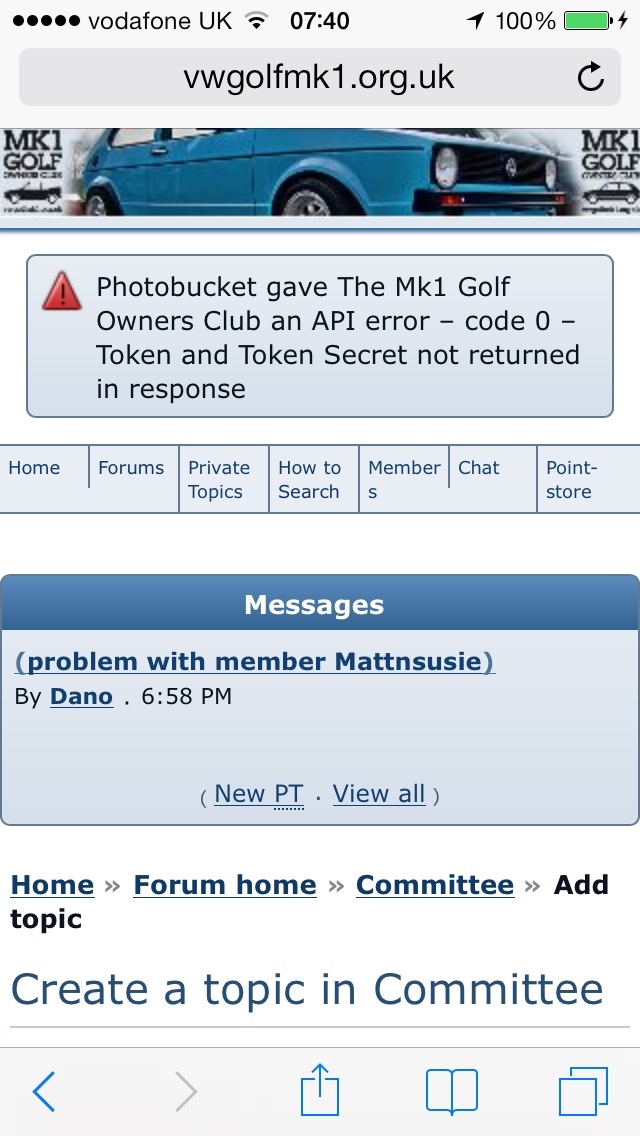
I am getting an error when I click add topic.
It appears at the top of the page.
I am on an iPhone 5 with iOS 7.
If I carry on and tick the photobucket box under upload I get the same error from them.
Posted
I managed to get in on my iPad by logging into photobucket from another window. The integration then let me select my setup. We do need to change the Composr Test key though as it will look strange to users.
Once in and with the Photobucket box ticked I then clicked upload, selected my image etc and the image uploaded to photobucket but in Composr it just created a new attachment rather than URL link.
Cheers
Ade
0 guests and 0 members have recently viewed this.


