

Unable to install Composr
Posted
#6819
(In Topic #1595)


I'm trying to install Composr on my Win 10 pc, with IIS, PHP and MySQL. But I'm getting below error: Could you please help?
HTTP Error 500.19 - Internal Server Error
The requested page cannot be accessed because the related configuration data for the page is invalid.
Posted


Moderator


That file is not critical, please try deleting it and seeing what happens.
In the mean-time, I'll look into it.
Posted
code
CREATE TABLE cms_catalogue_fields (
cf_options varchar(255) NOT NULL,
cf_put_in_search tinyint(1) NOT NULL,
cf_put_in_category tinyint(1) NOT NULL,
cf_required tinyint(1) NOT NULL,
cf_default longtext NOT NULL,
cf_searchable tinyint(1) NOT NULL,
cf_visible tinyint(1) NOT NULL,
cf_defines_order tinyint NOT NULL,
cf_order integer NOT NULL,
cf_type varchar(80) NOT NULL,
cf_description longtext NOT NULL,
cf_name longtext NOT NULL,
c_name varchar(80) NOT NULL,
id integer unsigned auto_increment NOT NULL,
PRIMARY KEY (id)
)
Posted
Moderator
I suspect the initial issue is due to IIS not having the rewrite module installed. However, I set up a test Windows 10 machine with IIS Express 10 and (1) rewrite came bundled and (2) even when I disabled it in the configuration and explicitly deleted the DLL and restarted IIS it still didn't complain. I think the version of IIS I installed is hard-coded to recognise IIS rewrite rule configuration (and ignore it) even when the rewrite extension is not installed. So I think this is an issue with different test environments. Our Web Platform installer for Composr does specify rewrite should be installed, and I'd recommend installing it. I'll document it as a dependency.
The catalogue_fields error, possibly caused by two copies of the installer running in parallel, and one removed the table while the other was using it. Or something like that. I'll code the installer to use ignore_user_abort(false); to try and reduce the chance of this happening.
Posted

Automated fix message
This issue has now been filed on the tracker as issue #4636, with a fix.TQ said
Hi Patrick,
Any update on this issue?
Even though I'm only getting a couple of emails a day, there is a significantly larger number of attempts displayed in the action log. With a membership of over 89,000 I am concerned that I will be loosing traffic because not everyone is aware of my direct email address.
I would very much appreciate it if you could take another look at this problem.
Kind regards
TQ
Posted
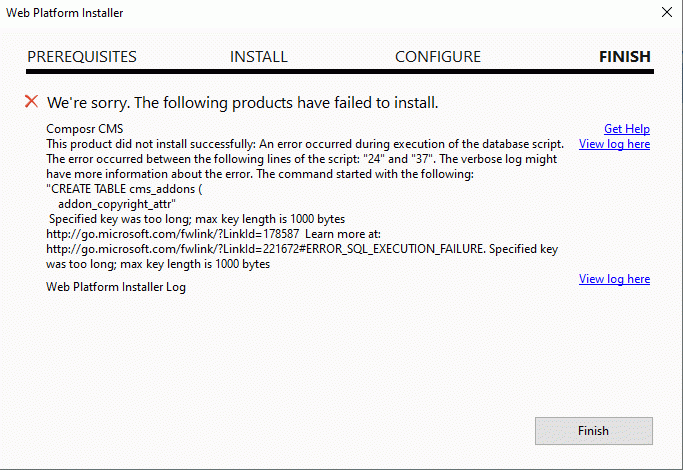
Anyhow, I got it working when installed manually and removing web.config + creating a table manually.
Thanks for your support! The CMS is looking good b t w.
Posted
Moderator
cnmuranjan said
Ok, Thanks for looking into. I tried installing using Web PI as well, and got below error:
Anyhow, I got it working when installed manually and removing web.config + creating a table manually.
Thanks for your support! The CMS is looking good b t w.
From “Post #7880”, 22nd Feb 2024
Thanks and thanks. The web platform installer has been re-released with some fixes.
Posted

1 guest and 0 members have recently viewed this.


