

Filter field mapping
Posted
#5995
(In Topic #1242)

Thanks….
Posted


Moderator


I'll clean it up.
Here's an example I just tested:
m_username=Their Username,Interests=Their Interests
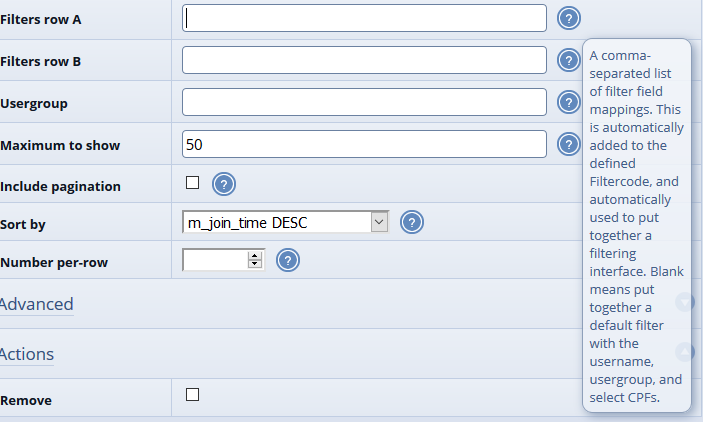
Comma-separated lists of something=somethingElse. Where something is either a f_members column name or the title of your CPF, and somethingElse is just the label you want on the filter.
Posted
Yes, I can see where your example above works but I tried all of these:Chris Graham said
Here's an example I just tested:
m_username=Their Username,Interests=Their Interests
Comma-separated lists of something=somethingElse. Where something is either a f_members column name or the title of your CPF, and somethingElse is just the label you want on the filter.
From “Post #6695”, 7th Feb 2021
State=State
Address: State=State
cms_state=State
field_32=State
and all returned: Unknown field xxxx. Skipping filter for this field.
Posted
Moderator
32=State
Sorry this is a tricky case. field_32 should have worked but there's a bug. In the ideal world "Address: State" would also have worked except the colon messes up the Filtercode syntax being used internally.
Posted
Chris Graham said
This should work:
32=State
Sorry this is a tricky case. field_32 should have worked but there's a bug. In the ideal world "Address: State" would also have worked except the colon messes up the Filtercode syntax being used internally.
From “Post #6698”, 9th Feb 2021
Perfect! Does the job….

Posted
I currently have this filters_row_a="36=Last name (at HHS),m_username=Username,usergroup=Usergroup" in the main_members block and it works great. I've not been able to figure out the syntax for accomplishing the same thing via editing the CNS_MEMBER_DIRECTORY_SCREEN.tpl file. Suggestions appreciated.
Thanks...
Posted
Moderator
{$BLOCK,block=main_members,block_id=md,max={$CONFIG_OPTION,members_per_page},sort={$CONFIG_OPTION,md_default_sort_order},display_mode=listing,filters_row_a=36=Last name (at HHS)\,m_username=Username\,usergroup=Usergroup}
Or you can do…
Code
{$COMCODE,your regular block Comcode goes here}
The latter isn't ideal though as it has to load up the Comcode parser on every page view.
Posted
Perfect….I figured it needed some kind of escape sequence but couldn't figure it out. Works great. Thanks…Chris Graham said
Try:
{$BLOCK,block=main_members,block_id=md,max={$CONFIG_OPTION,members_per_page},sort={$CONFIG_OPTION,md_default_sort_order},display_mode=listing,filters_row_a=36=Last name (at HHS)\,m_username=Username\,usergroup=Usergroup}
Or you can do…
The latter isn't ideal though as it has to load up the Comcode parser on every page view.Code
{$COMCODE,your regular block Comcode goes here}
From “Post #6807”, 29th Mar 2021
3 guests and 0 members have recently viewed this.


