

Trying to go to configuration after installation
Posted
#573
(In Topic #166)


I installed composr on my local machine working with Windows and Wamp.
When the installation finished I clicked on the link to go to configuration.
It is trying to go to:
Code (php)
And I get the error: Server not found.
Can you please help?
Is there a way to subscribe to the forum posts so I'll get an email notification when somebody answers my question?
Thanks
Posted



Core Developer


Temporary workaround until the problem is confirmed / fixed: remove the p and the backslash in your URL that appears after .com and see if that takes you to where you need to be.Sigal said
<br />Is there a way to subscribe to the forum posts so I'll get an email notification when somebody answers my question?<br /><br />Thanks<br /><input class="cms_keep_ui_controlled" size="45" title="From “Post #518”, 17th Apr 2016" type="button" value="snapback Comcode tag (dbl-click to edit/delete)" />
Also in terms of monitoring this forum, make sure you click the "monitor" button. If it instead reads "unmonitor" then you are good to go and thus don't click it.
Then make sure you have set to receive email notifications by going to
Sigal

Open Source CMS with advanced social, interactive and dynamic features. Fully flexible, themeable and extendible: suitable for building powerful websites.
Hope this helps

Posted
The p is part of my url which is: highland.comp. I removed the backslash and clicked Enter but it just goes back to the same url with the backslash.
Posted
Core Developer
Sigal said
Thank you Patrick.
The p is part of my url which is: highland.comp. I removed the backslash and clicked Enter but it just goes back to the same url with the backslash.
From “Ebay Store”, 11th Jan 2016
No problem, and my apologies on the URL misread. That's quite strange. I'm unable to reproduce the issue on my server. Did you check to see if maybe you accidentally added a backslash in your base URL config option or in any of your rewrite rules (if applicable)?

Moderator


New installations:-
When you reach Step 4 of the installer, amend the Base URL by removing any erroneous %5C's before proceeding.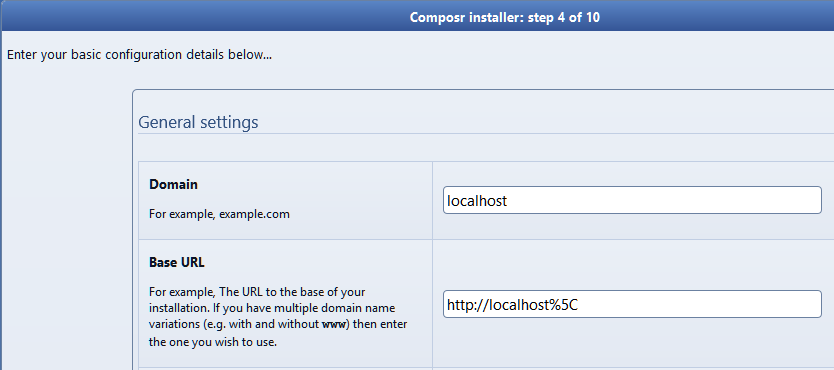
Existing installations:-
Just edit your _config.php and amend the Base URL:-Code
$SITE_INFO['base_url'] = 'http://localhost%5C
Posted
Posted
Moderator

So, no I didn't uninstall yet, and will check the config file.
Thanks guys, your support really impresses me.
Posted
Code (php)
Waited for a long time, got the login screen, put my login details in and got an error (See attached doc)
I did not install your forum because I don't need a forum in my site.
Critical error.docx
(Click to enlarge)
Posted
Moderator
Posted

Moderator
Posted
Moderator
0 guests and 0 members have recently viewed this.

