

permission issue with emoticons?
Posted
#5965
(In Topic #1237)


Error
The page you are trying to access is restricted due to a security rule.
If you believe the security rule is affecting the normal operation of your website, contact your host support team and provide detailed instructions how to recreate this error.
They will be able to assist you with rectifying the problem and adjusting the security configuration if needed.
Emoticons seem to be working everywhere else (forums, etc), so this seems to be specific to galleries.
Any idea what is going on and/or how I can fix this?
Thanks in advance for your help!
Posted


Moderator


Nobody here could really comment on it, you'd need to ask the webhost, provide them specifics including the URL you clicked from and that data/emoticons.php is the URL you clicked on.
Posted
Chris Graham said
That sounds like a webhost's custom ModSecurity configuration.
Nobody here could really comment on it, you'd need to ask the webhost, provide them specifics including the URL you clicked from and that data/emoticons.php is the URL you clicked on.
From “Post #6664”, 22nd Jan 2021
Sounds good. Thanks Chris.
I'll speak to my web hosting service provider tomorrow. Thanks for pointing me in the right direction.
Posted
Okay, my ISP/web hosting provider is going to look into this for me. However, the second error problem that I am experiencing they said is probably on the part of the developer. Here is a screenshot of the error message I am getting (yeah, attachments worked this timecwdean said
Sounds good. Thanks Chris.Chris Graham said
That sounds like a webhost's custom ModSecurity configuration.
Nobody here could really comment on it, you'd need to ask the webhost, provide them specifics including the URL you clicked from and that data/emoticons.php is the URL you clicked on.
From “Post #6664”, 22nd Jan 2021
I'll speak to my web hosting service provider tomorrow. Thanks for pointing me in the right direction.
From “Post #6665”, 23rd Jan 2021
 ).
).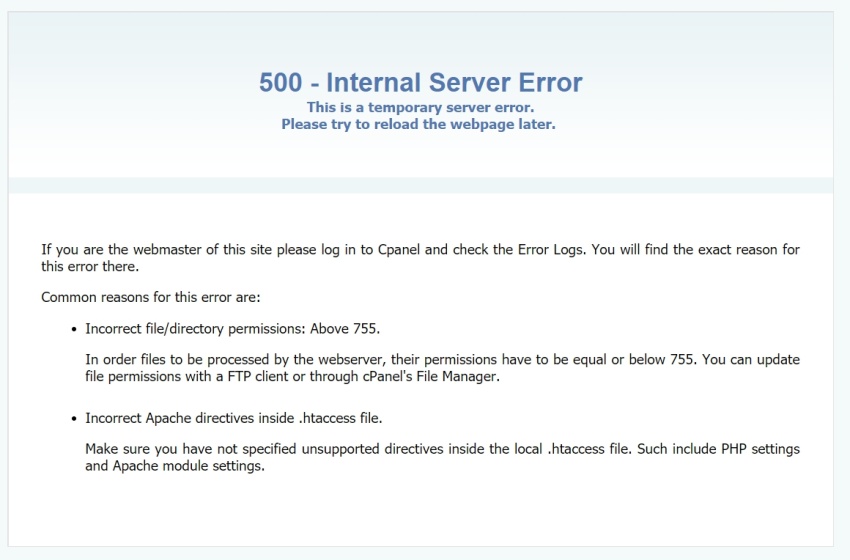 Basically, as I'm working on the site or using the site, I get this message about 3 to 4 times per hour. If I wait a minute I am able to refresh the page and everything is fine. However, I don't think my site users are going to be happy with this. It's extremely inconvenient.
Any thoughts on how I can fix this?
Posted
Moderator
However, it could also be ModSecurity. ModSecurity can be configured to give out '500' errors, or any other error status I think.
If it were an error from Composr, it would look as such.
Other possibilities include some kind of file permission problem, but that would be consistent rather than intermittent.
Posted
Chris Graham said
You can see if anything is in the Composr error log, or the Apache error log.
However, it could also be ModSecurity. ModSecurity can be configured to give out '500' errors, or any other error status I think.
If it were an error from Composr, it would look as such.
Other possibilities include some kind of file permission problem, but that would be consistent rather than intermittent.
From “I'm back, and loving it! ”, 28th Jan 2021
Okay, I'll see if I can check the logs but I'm not a web expert…so I'm not sure where those are located.
My web host provider (Siteground) has checked my account for security and has confirmed that everything looks good to them. They are going to look deeper into my emoticon issue, but everything else looks good to them.
Posted
Moderator
But usually you can find an explicit icon for it in web hosting control panels.
Using some kind of file manager, it might be in a directory called 'logs' or something similar, usually one level up from the web directory.
It's a text file.
Composr's error log (which includes PHP errors) is under the Admin Zone > Audit menu. The file is data_custom/errorlog.php.
Chris Graham said
Where the Apache error log is really depends on the system.
But usually you can find an explicit icon for it in web hosting control panels.
Using some kind of file manager, it might be in a directory called 'logs' or something similar, usually one level up from the web directory.
It's a text file.
Composr's error log (which includes PHP errors) is under the Admin Zone > Audit menu. The file is data_custom/errorlog.php.
From “Post #6675”, 29th Jan 2021
Thanks for pointing out where I can find the log files. Much appreciated!
It turns out the problem was with process limits. Siteground has that set to 20 connections max…which should be more than plenty. However, IMAP connections that are configured for server notifications are known to sometimes hang and not free up its connection. After a while this can exhaust the 20 connection limit which will result in the occasional 500 ISR error.
Hopefully, after reconfiguring my IMAP email accounts, this problem will no longer occur.
That was an interesting lesson for me today

6 guests and 0 members have recently viewed this.


