

Sub-category sorting
Posted
#5438
(In Topic #1110)

Need info on how to sort for sub-categories
Hopefully the last two question before I start the big roll out, and then tighten up design and roll out to users.I've imported 900+ entries in my first category (Television) as subcategories, and now they display (Thanks Chris!). There are 938 subcategories under Television, and there'll probably be a few hundred under Movies.
First question: I've not been able to find anything on how sorting is done, besides a catalogues.php/catalogues2.php script that sorts off of the id column. I'd like to be able to sort off of the category name, specifically the cms_catalogue_categories.cc_title field. Changes made to the catalogues2.php script didn't make any difference. Attaching a screenshot showing it's in database order.
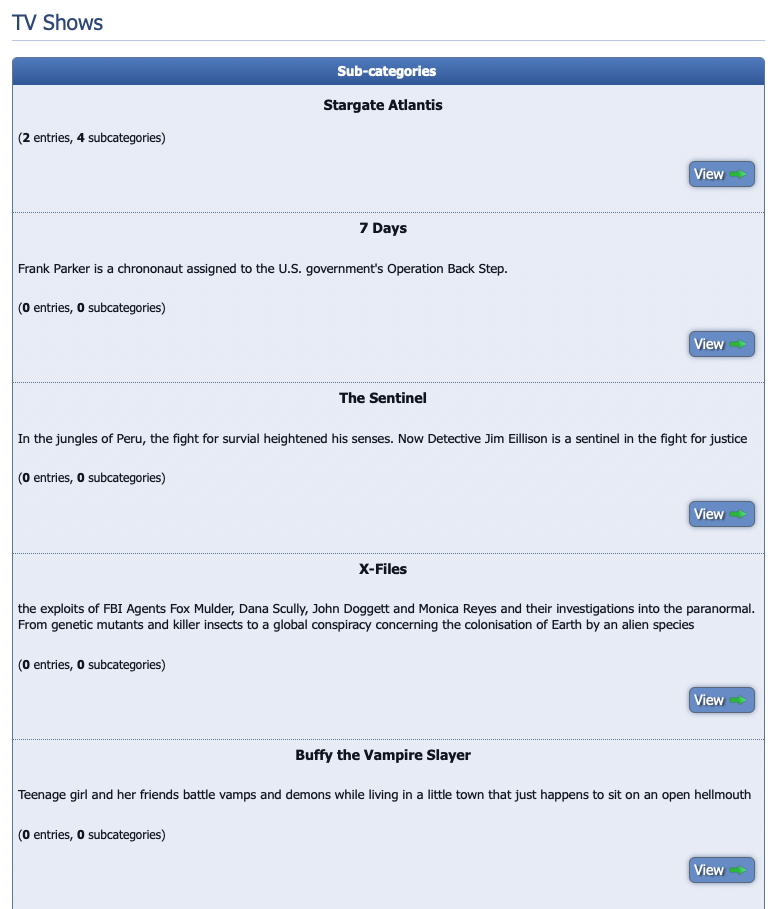
Second question: I had it defined as displaying the 150 subcategories in the configuration, and that works. What doesn't appear to work is a "Next" button to take me to the next 150, etc. Is that not part of the code? Or should I change my configuration to display N+1, where N is the maximum number of subcategories I have?
 Last edit: by walterhpdx
Posted


Moderator


1) Actually you found a bug. I'm surprised, but I guess thus far v10 users just added them in alphabetically order to start with. Fixed in https://github.com/ocproducts/composr/commit/4ed4d8240449968c331b5db58aeb4df0d2f01d17
2) I'm looking into that.
Posted
Moderator
Posted
0 guests and 0 members have recently viewed this.



