

[How To] Make Side-Shoutbox a full shout box!


For communities that want a more traditional shoutbox
Do you have a forum-ran community? Have you ever wanted to use Composer's side-shoutbox as a top of the forum traditional shoutbox? Want to do so while removing the extra fluff that would make it look weird?Well in this little tutorial I'll show you how to change the default sidepanel shoutbox to this:
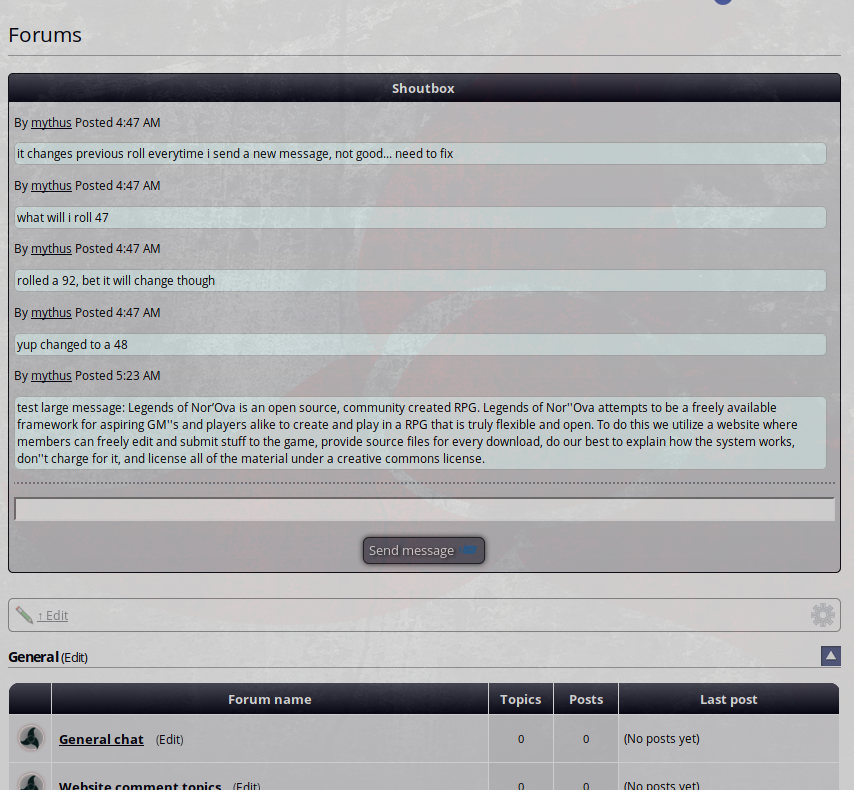
I'll even show you how to put it at the top of your forums! It will require some template edits, so please make backups of all affected files first!
First step is that we need to make a comcode page. Go to Pages (Comcode pages) in the Content menu in your administrator zone. You'll want to add a new page so go to the bottom of that screen and type in a name proceeded by a colon. For example, you could type in :shoutbox. Whatever you do, don't name it after an existing page, especially don't name it Chat because you will get crazy results if you do.
For that comcode page, go ahead and delete everything on it (the h1 tag and the childpages stuff). Then using the dynamic block assistant on the fancy WYSIWYG editor (looks like a little red box), add the "Shout Box (side_shoutbox)" item.
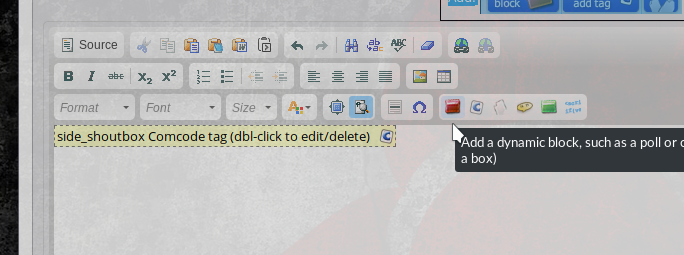
Just fill out the defaults as needed. Once done, save the page.
Step Two is to edit the CNS_FORUMS template. Make sure to edit the template of the theme you are using. Place this in that template:
Code
{+START,IF,{$EQ,{ID},1}}

{$LOAD_PAGE,shoutbox}

{+END}
Change "shoutbox" to whatever you named your comcode page. Place that after
Code
{+START,IF_NON_EMPTY,{$TRIM,{FILTERS}}}

<div class="box box___cns_forum">    <div class="box_inner">

       <span class="cns_pt_category_filters">{!CATEGORIES}:</span> {FILTERS}

    </div> </div>

{+END}
If you want the shoutbox at the bottom of your forum, you could try placing it after TOPIC_WRAPPER.
Step Three. Now that you have your shoutbox at the top of your forum, we need to make it not so bulky. So, we need to replace some templates.
The first template we'll replace is BLOCK_SIDE_SHOUTBOX_MESSAGE.tpl Just replace everything in that template with the following:
Code
<div class="associated_details">

        <p>{!BY_SIMPLE,{MEMBER} {!POSTED_TIME_SIMPLE,{TIME*}}</p>

        <div class="chatbubble">{MESSAGE}</div>

</div>
That will make the messages not so bulky. If you want your shoutbox to look like mine with the little horizontal line seperating the chatting from the chat input box, edit BLOCK_SIDE_SHOUTBOX.tpl and add the
Code
<hr />Step Four. Now that we have the templates done, you need to add a bit of CSS. So go and edit your global.css file and place the following at the bottom of the file:
Code
.chatbubble {

    background-color: #F0FFFF;

    border: 1px solid #c8c8c8;

    border-radius: 5px;

    max-width: 69em;

    max-height: 12em;

    text-align: left;

    padding: 2px;

    overflow: auto;

}
You can edit the css as you like. Want a different background color for the bubble, change the background-color bit. Don't want to have a max-height, then remove it. I find that a max-height and max-width prevents the bubble from escaping the shoutbox while allowing it to display the whole message instead of truncating it.
Please note that these edits will affect the side_shoutbox. For example, it made mine look like
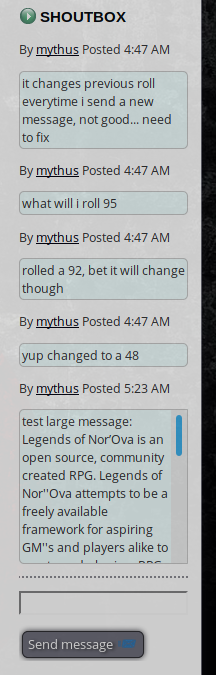
Anyways I hope you find this helpful!
 Last edit: by Chris Graham
I was going to add it to the tutorials section; but I can't quite make out how to do so. Is it a blog? Is it a news article? I'm not sure, so I'll leave it here for now
 .
.EDIT: I figured out how to do so, at least I think so lol. So I submitted it to the tutorials.
Last edit: by mythus
Posted


Moderator


I have cleaned up the code formatting on the post, I think the WYSIWYG editor mangled your code tags a bit – hopefully I got it right and am working to stop HTML-within-Comcode-within-WYSIWYG causing similar issues in the future.
1 guest and 0 members have recently viewed this.


