

[SOLVED] Table of Contents Using heading tags?
Posted
#3845
(In Topic #767)

For some reason I remember Chris saying that the comcode contents (Table of Contents) block can work using the html heading tags, ie
Code
Stuff
Instead of relying on the comcode Title tags…
Code
[title=2]Stuff[/title]
I've yet to see this work. Did I perhaps remember this incorrectly? Likely I did. Is there a way to make the Table of Contents use html headings?
 Last edit: by mythus
Posted


Moderator


It should work.
Actually I just tested and couldn't get it not to work. I tried with plain Comcode, and WYSIWYG HTML, both with and without Comcode conversion enabled (btw, don't enable Comcode conversion to test unless you really want it).
Here's an example of HTML that worked:
Code
[contents][/contents]

<h2>Foo</h2>

<h3>Bar</h3>

<h2>Test</h2>
I'm not denying the issue, but I'll need a failing test case like this to debug.
Posted
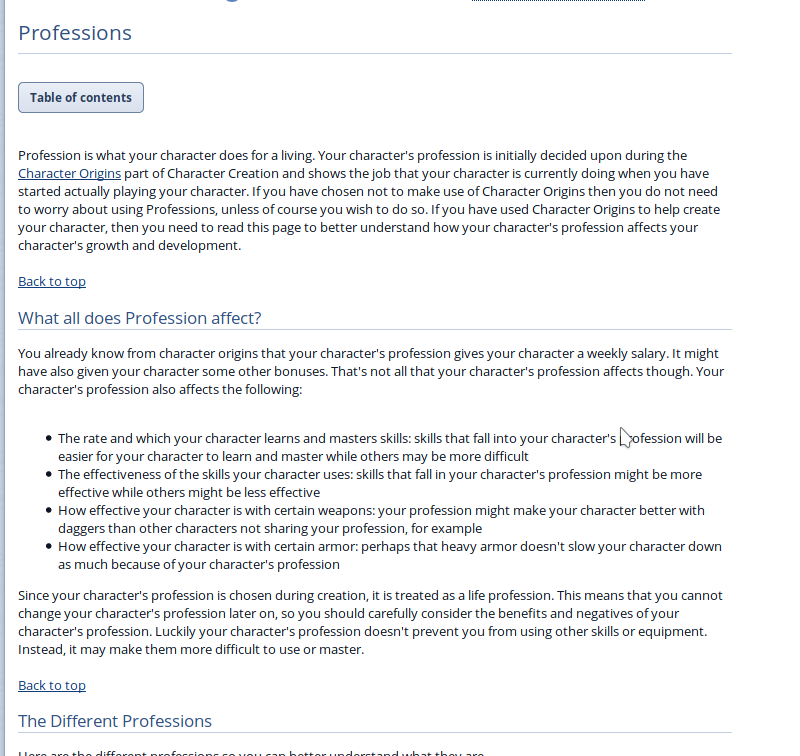
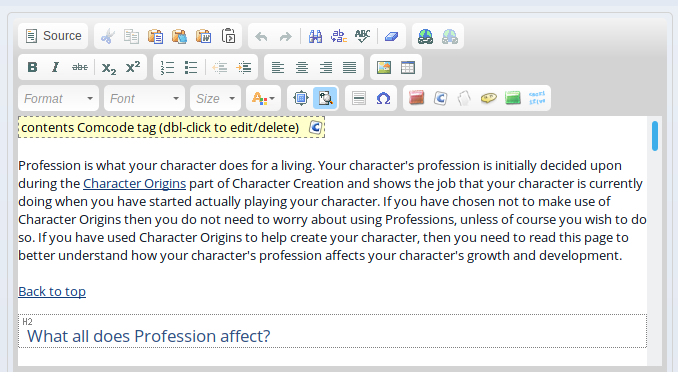
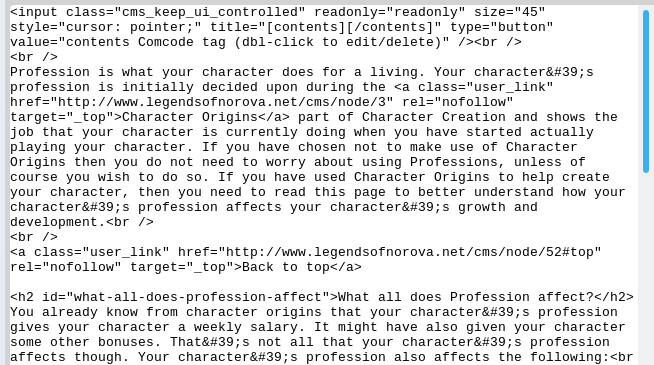
Here's screenshots showing you the issues I'm having…
Posted
Moderator
Posted
Code
<input class="cms_keep_ui_controlled" readonly="readonly" size="45" style="cursor: pointer;" title="[contents][/contents]" type="button" value="contents Comcode tag (dbl-click to edit/delete)" /><br />
<br />
Profession is what your character does for a living. Your character's profession is initially decided upon during the <a class="user_link" href="http://www.legendsofnorova.net/ocportal/index.php?page=wiki&type=browse&id=12&keep_wiki_root=20">Character Origins</a> part of Character Creation and shows the job that your character is currently doing when you have started actually playing your character. If you have chosen not to make use of Character Origins then you do not need to worry about using Professions, unless of course you wish to do so. If you have used Character Origins to help create your character, then you need to read this page to better understand how your character's profession affects your character's growth and development.<br />
<br />
<a class="user_link" href="#top" rel="nofollow nofollow" target="_top">Back to top</a>
<h2 id="what-all-does-profession-affect">What all does Profession affect?</h2>
You already know from character origins that your character's profession gives your character a weekly salary. It might have also given your character some other bonuses. That's not all that your character's profession affects though. Your character's profession also affects the following:<br />
<ul>
<li>The rate and which your character learns and masters skills: skills that fall into your character's profession will be easier for your character to learn and master while others may be more difficult</li>
<li>The effectiveness of the skills your character uses: skills that fall in your character's profession might be more effective while others might be less effective</li>
<li>How effective your character is with certain weapons: your profession might make your character better with daggers than other characters not sharing your profession, for example</li>
<li>How effective your character is with certain armor: perhaps that heavy armor doesn't slow your character down as much because of your character's profession</li>
</ul>
Since your character's profession is chosen during creation, it is treated as a life profession. This means that you cannot change your character's profession later on, so you should carefully consider the benefits and negatives of your character's profession. Luckily your character's profession doesn't prevent you from using other skills or equipment. Instead, it may make them more difficult to use or master.<br />
<br />
<a class="user_link" href="#top" rel="nofollow nofollow" target="_top">Back to top</a>
Posted
The id="namehere" inside of the h2 tag is confusing the contents comcode. Removing that bit makes it work.
So either I have to apply the title=2 comcode tags to my headers, go through the larger work of removing the header id's, or hope that the great and all-powerful Chris has a better solution lol. Sigh...
Posted
Moderator
Moderator
It is probably safe to copy the latest of these 2 files to fix it…
sources/comcode_from_html.php
sources/comcode_renderer.php
But take backups of the replaced files first.
Posted
Moderator
0 guests and 0 members have recently viewed this.



