

Memory Exhausted
Posted
#2904
(In Topic #565)

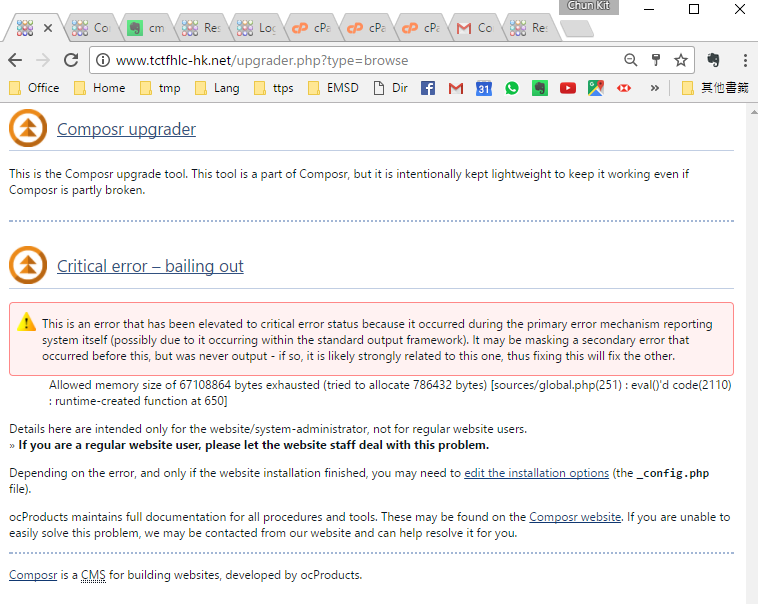
I have already used .user.ini to put in memory_limit=256M
But the same error. What can I do? I used Godaddy hosting.
Posted


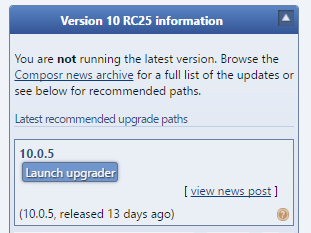
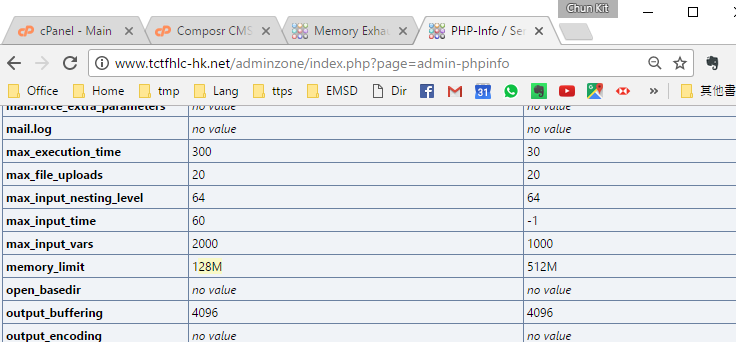
Home → Admin Zone → Tools → PHP-Info / Server Checks
Search for memory_limit
If this isn't the 256MB that you set, then I would suggest you didn't adjust this setting correctly for godaddy. You may need to reach out to godaddy on how to change it. If this is 256MB then please let us know here.
You could also try the recommended.htaccess, rename to .htaccess
This may or may not work for you.
 Last edit: by Paul Flavel
Posted
It's 128M follow your instruction.
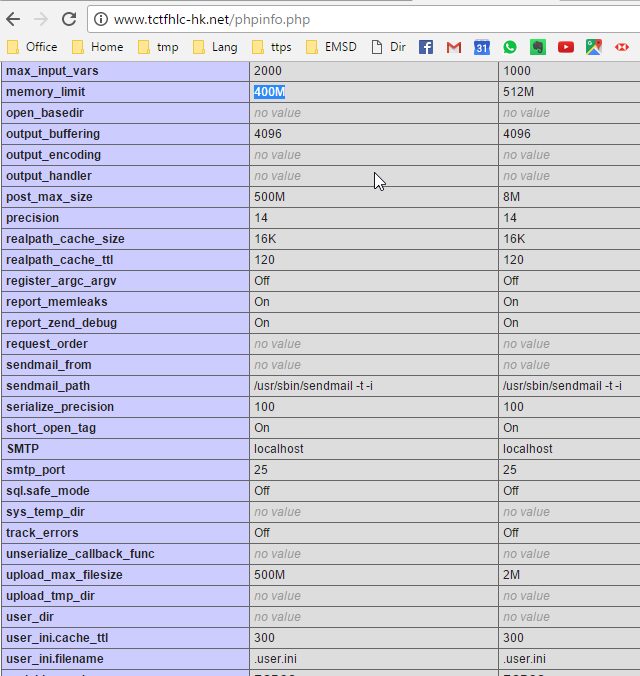
I created another phpinfo() at public_html, it returned 400M. I set 400M with .user.ini in public_html
Posted
What version are you upgrading from?
Posted
I would suggest you upgrade one version at a time, until you reach the current version.
This may be a little tricky.
First do a website backup……
Full list of manual updates per version:
Code
Code
Code
Code
Code
This should work. In theory.
Please let me know how you go.
The other option (and better option, if you are comfortable with ftp etc) you have is to "generate a personalised manual upgrader", there is a link for this on the upgrade page where you would normaly place your version link:
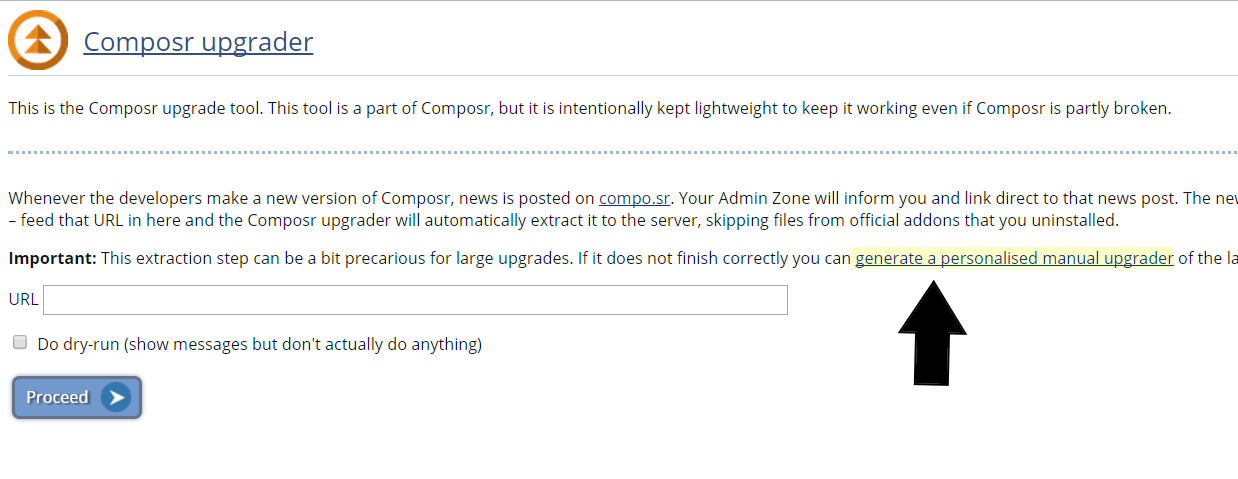
Download, extract then using ftp upload.
Last edit: by Paul Flavel
Posted
You mean I download an upgrade packages, extract and upload (no other steps) and then repeat?
Code
Code
Code
Code
Code

Try using the below in your address bar
upgrader.php?type=file_upgrade&tar_url=
In my screenshot you will see a field to enter the addresses per my last post.
I would go for the manual option. Per the link in my image previously.
I have modified my generated link to be from 10.RC25 to 10.0.5
Click here
This should work. Did it on my mb.
Download, extract it then upload.
Remember. Always do a website full backup. Just incase.
Last edit: by Paul Flavel
Posted
Posted
I appended "/upgrader.php?type=file_upgrade" to to my site URL and could access the upgrader page with url input box after entered the Master Password.
The URL I used was your "generated link to be from 10.RC25 to 10.0.5".
But why your link is 62M. But this "
Code
From the
Composr CMS

Open Source CMS with advanced social, interactive and dynamic features. Fully flexible, themeable and extendible: suitable for building powerful websites.
Last edit: by kitonline
Posted
compo.sr homepage not loaded fully.mp4
Posted


Moderator


kitonline said
Just done it and it was sucessful.
I appended "/upgrader.php?type=file_upgrade" to to my site URL and could access the upgrader page with url input box after entered the Master Password.
The URL I used was your "generated link to be from 10.RC25 to 10.0.5".
But why your link is 62M. But this "I got from https://composr.app/news/view/new-releases/composr-10-0-5-released.htm is only 19M.Code
From theI can't find I link to https://composr.app/news/view/new-releases/composr-10-0-5-released.htm. I have to google to reach it. Composr CMS
Open Source CMS with advanced social, interactive and dynamic features. Fully flexible, themeable and extendible: suitable for building powerful websites.
From “Post #2914”, 3rd Jun 2017
The personal generated links consider what addons you have installed for the files extracted but also include full copies of all the non-installed addons as TAR files. It's the only way we can do it for manual extraction. For the automatic extraction it will update the existing non-install addon TAR files with updated files dynamically.
Posted
Moderator
kitonline said
The lower part of the compo.sr homepage took ~20 second to load. See the screen recording.
compo.sr homepage not loaded fully.mp4
From “Post #2915”, 3rd Jun 2017
Thank you for the constructive feedback. I've just made a number of optimisations. It will still take a few seconds for the tutorial carousels to load because there's a lot of data in there (all the tooltips), but I have deferred them so it doesn't affect the rest of the page loading.
Posted
Moderator
kitonline said
Won't a daily update be good enough?
From “Post #2924”, 4th Jun 2017
I'm not really sure what you mean. However, if you're suggesting new versions of Composr daily that's not feasible, they need some manual testing, and each release has the potential to require some manual work by themers in updating themes, or people with overridden code files, so it would use up too many resources for everyone to have the updates coming out daily.
Posted
Moderator
kitonline said
I used php 5.6. I try to upgrade to 10.0.5. The error is "Allowed memory size of 67108864 bytes exhausted (tried to allocate 786432 bytes) [sources/global.php(251) : eval()'d code(2110) : runtime-created function at 650]"
I have already used .user.ini to put in memory_limit=256M
But the same error. What can I do? I used Godaddy hosting.
From “Post #2884”, 1st Jun 2017
Composr sets a lower memory limit, but it also raises it again for high-memory operations like upgrading.
Some web-hosts actually block changing of the memory limit, it is possible this was your problem, although I did not find any evidence of GoDaddy doing this from their website.
I have made some performance improvements that should make it use less memory and operate faster for future users. This will take a couple of upgrades to take effect, as the upgrader itself wouldn't be upgraded until after the next upgrade is done.
13 guests and 0 members have recently viewed this.

