

Code Editor Character Mismatch Flaw
Posted
#2717
(In Topic #535)

Charcter Mismatching while using copy/past function
Ok, I'm going to have to blame the code editor here (while editing template files) for having this flaw. Now I could be wrong, but I'm 95% certain after extensive investigation.I have checked to make sure my text editor (UltraEdit 64bit) is set to use UTF-8 and disabled the "Allow low ASCII values to be entered (usually control codes) in my configuration.
THE PROBLEM - (The Dash Characater)
Character: "-" (Copying and pasting the dash symbol) especially two dashes "--"Such as using the HTML comment syntax: <-- Comment -->
If you copy and past "<--" , "-->", or "--" from your text editor and past it in the Composr editor/Search tool, the editor recognizes it as one long line two charcters in length and not just two dashes "--".
note: However, the code editor does recognize two dashes if you type them in with your keyboard into the code editor itself.
Recreating The Issue
You may test this yourself if you wish.1.) Place a <-- Comment --> in your favorite text editor. Or better yet, simply comment out some code.
2.) Copy and past this into a *.tpl file of your choice inside of composr.
3.) Save the *.tpl file
4.) Clear ALL caches. Your browser cach & composr cach. "Clear Everything"!
5.) Load the page that the template file effects. You should then see the flaw.
I was having this issue while editing the "MENU_BRANCH_dropdown_tpl" I wanted to comment out the <img> so the menu icons would not display.
I have had this same issue appear while working on 4 different websites. So I think this justifies me bringing up the issue.
If someone can not recreate this issue? Please let me know. I will then have to lay blame either on my own text editor, bad ram, or something else?
If this could be resolved, then great! I'm simply bringing awareness to this issue.
 Last edit: by vynum
Posted


html comment syntax is actually:
<!– comment →
Last edit: by Paul Flavel
Posted
Per link
Find menu__dropdown.css, then add the following down the bottom:
Code
			.menu_type__dropdown img {

    max-width: 20px;

    display: none;

}
Posted
Did you copy and paste that from a text file or website and then paste it into this forum?
Look at your post very closely. If you did perform a copy/paste into this forum then
you just helped me validate the "topic" of this thread.
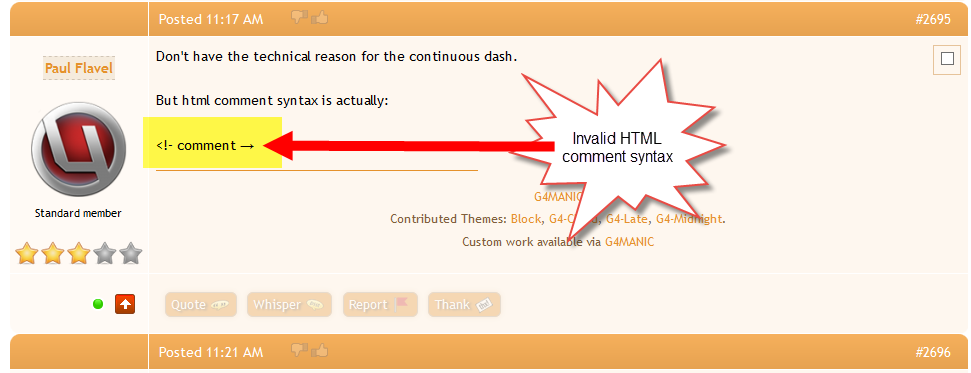
Please review:
https://www.w3schools.com/html/html_comments.asp
https://www.w3schools.com/tags/tag_comment.asp
You are also misunderstanding the "topic" of my post.
My post is about, and has to do with the "CKeditor" itself. Not HTML comment syntax nor does it have to do with hiding menu icons. That has been covered already in a seperate thread.
Posted
Using code editor to edit the template file it will honor the html.
Forum uses ckeditor
Template editing is done via code editor if:
Home→ Admin Zone→ Setup→ Configuration→ Accessibility options
Enable code editor - enabled
code editor and ckeditor are two different things.
Anyway. All the best.
Posted
You are correct. But for the sake of newcomers to html that might see this post and since you posted incorrect syntax, perhaps by accident, I had no choice but to clarify the proper syntax.Forum uses ckeditor
Template editing is done via code editor.
code editor and ckeditor are two different things.
None the less my post was intended to simply bring awareness to the "Code Editor" flaw on my side. If no one else is having this issue then they have nothing to worry about.
Again, if you posted your syntax from a "copy & paste" method into this forum, then it proves validity that even the CKeditor is having the same issue!
Thank you for correcting me and I do appreciate your help and input

Posted
Try using <!-- comment -->
Note the !
Tried it on one of my template files and it works as intended.
Posted
<!– comment →
And from what source did it come from? The reason I am asking is that I have never seen an HTML comment that closed with a "→"
Also, I have never seen anyone use it, nor have I ever seen any examples of it being used as HTML code anywere on the net?
Is that a Unicode arrow? Is that an ASCII charcter? It's not on my keyboard that I can see?
Posted
Minus the extra spaces:
< ! - - comment - - >
I have added extra spaces so it shows properly in the forum. Remove the extra spaces when you use it via the code editor for your template file.
HTML Comments

W3Schools offers free online tutorials, references and exercises in all the major languages of the web. Covering popular subjects like HTML, CSS, JavaScript, Python, SQL, Java, and many, many more.
Posted
Ignore the way ckeditor is displaying it
But we shouldn't have to ignore it!
Now that brings this full circle. That is exactly why I started this topic. CKeditor & Code editor has a flaw no doubt.
You even had to perform a correction in the forum yourself. I on the other hand figured it out in about 2 hours of scratching my head 00 lol, I had to perform corrections while editing *tpl files.
It is a parser issue because while using the quote tags in the forums it turns this "<–" into the arrow thingy.
Now, with that in mind, allow me to repeat myself without placing it in quotes because the block quotes messes it up.
If you copy and past "<–" , "–>", or "-" from your text editor and past it in the Composr editor/Search tool, the editor recognizes it as one long line two charcters in length and not just two dashes "–".
note: However, the code editor does recognize two dashes if you type them in with your keyboard into the code editor itself.
So, if anyone new to Composr runs in to this problem, be aware of this issue and undestand how to correct it. Hopefully the parser issue will be resolved one day. Again, I'm not asking for it to be correct at this very moment. I just want to bring awareness to the issue.
Thanks Paul for your comments and response.
Posted
I was reading too much into it. Yes If you copy it from say here and paste it into the code editor then it doesn't like it. But if you try and paste the same into say notepad or notepad++ it also doesn't like it. I would point my finger at ckeditor in the forum for how it parses it. Which unfortuantely is the way ckeditor is. Never been a big fan of ckeditor to be honest.
Posted
Posted


Moderator


CKEditor is used for content.
Editarea is used for templates.
Double dashes are parsed into long dashes. This is a part of Comcode, not directly related to CKEditor or Editarea. However it only happens for content, not templates.
Likely the difference in the editors, combined with explaining things using content, with copying and pasting, is causing the misunderstanding.
There may also be a separate misunderstanding about the syntax for HTML comments, which is making you think the issue carries over to Editarea too.
Going direct from a text editor (or typing directly) into the template editor (Editarea) should not have any issue at all.
As for there being issues typing into content, I will have a think about that.
Posted
Moderator
9 guests and 0 members have recently viewed this.

