

Custom fields
Posted
#2667
(In Topic #526)


Using {FIELD_69} to display the contents of custom field_69 within the downloads template does not render.
Using:
| Name | Current |
|---|---|
| {DIRECTIVE_EMBEDMENT} |
Does not list the custom fields of the downloads either. The downloads template does not appear to work the same as the catalogues do.
Posted


Moderator


{$CATALOGUE_ENTRY_FIELD_VALUE,{$CATALOGUE_ENTRY_FOR,download,{ID}},0}
I added a tracker issue, I like the idea of what you expected to happen:
0003269: Pass in custom field template parameters directly to content templates - Composr CMS feature tracker
Posted
For those that want an explanation of why I wanted this and how I used it in the doanloads template.
Code
			{+START,IF_NON_EMPTY,{$CATALOGUE_ENTRY_FIELD_VALUE,{$CATALOGUE_ENTRY_FOR,download,{ID}},0}}

                        <tr>

                            <th class="de_th metadata_title">Version</th>

                            <td>

                                {$CATALOGUE_ENTRY_FIELD_VALUE,{$CATALOGUE_ENTRY_FOR,download,{ID}},0}

                            </td>

                        </tr>

{+END}
Code
{+START,IF_NON_EMPTY,{$CATALOGUE_ENTRY_FIELD_VALUE,{$CATALOGUE_ENTRY_FOR,download,{ID}},0}}
The first call is to only show this field if it's not empty.
Code
{$CATALOGUE_ENTRY_FIELD_VALUE,{$CATALOGUE_ENTRY_FOR,download,{ID}},0}
Shows the content of the first custom field in the download, noting it starts from 0.
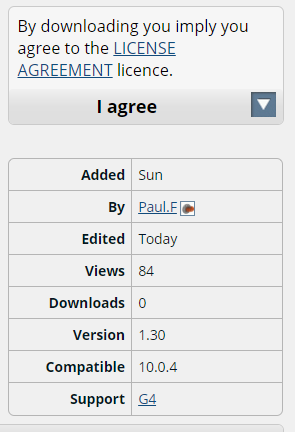
In your custom field ensure you have visible unticked. This way that field will only show in your new table entry per above pic.
So far there are 3 custom fields being used: Version (This should already be a download feature, but isn't so had to create a custom field), Compatible and Support (Referencing our support forum for the download).
 Last edit: by Paul Flavel
1 guest and 0 members have recently viewed this.

