

Missing/Disappeared
Posted
#2334
(In Topic #474)

Zone:Site & Page Permissions - (Vanished)
This is very strange to start having things disappear on me?MISSING in Edit zone: "site"

Missing "Zone:Site" in Permissions Tree Editor

This is what is currently in my "Permissions Tree Editor" There is no "Zone:Site" !
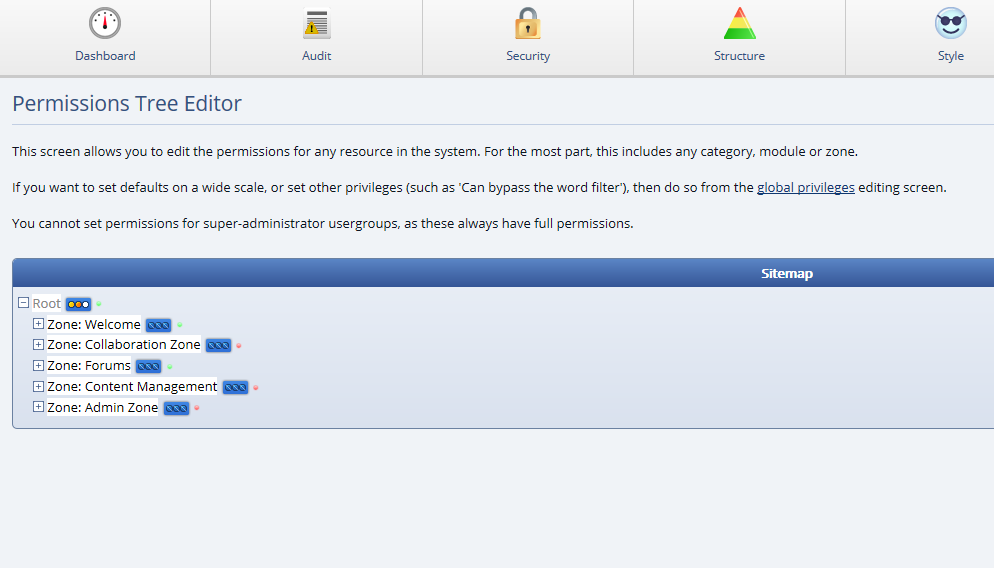
MIssing: Admin Zone>Structure>Permissions
Therefore I don't have the choice to choose "Page Permissions".

Posted
From the explination found here:
Composr Tutorial: Composr site structure

Open Source CMS with advanced social, interactive and dynamic features. Fully flexible, themeable and extendible: suitable for building powerful websites.
Site: this is your main website; it includes primary content viewing, and permission based submission, editing, and deleting features. The contents of this zone may automatically be merged into the Welcome Zone via the 'Single public zone' option, which will simplify things for you
During installation I think I did elect to have a 'Single public zone' there fore "this zone may automatically be merged into the Welcome Zone".
but now I don't have the abiltiy to view and edit "Page Permissions" . Which kind of sucks because I have gotton acustomed to this.
Can I revert the site back to multiple zone to get my "Zone:Site" back with out any repercussions?
 Last edit: by vynum
Posted
PARTLY SOLVED
I would probably leave this topic up for new Composr users just in case they run into the same situation.
I simply rectified my problem and got my "Zone:edit" back by going to;
→ Home > Admin Zone > Setup > Configuration > Site options
Under Structure section I unticked "Single Public Zone".
PAGE PERMISSIONS <- Did not come back
Last edit: by vynum
Posted


Moderator


- "Missing "Zone
 ite" in Permissions Tree Editor"
 - "This is what is currently in my "Permissions Tree Editor" There is no "Zone
ite" !"
Are these different websites? I suspect '1' is a different website and an old pre-release version, because it should not be possible for this to start at 'Zone: Welcome' (it should start at 'Root' like in the second screenshot).
Anyway, all the site zone modules can be found under 'Zone: Welcome' if the single public zone option is on.
Posted
This image is from the tutorail page. Illustraing were "zone:site" was suppose to be. But now I am assuming the tutorial's page was not in "single public zone".1."Missing "Zoneite" in Permissions Tree Editor"
This is my permissions tree editor showing that "zone:site" is gone. And no, I expanded the Welcome zone and the zone site module "zone:site" was not there either. While looking for my "zone:site" my website was in "single public zone".2. "This is what is currently in my "Permissions Tree Editor" There is no "Zone
So, since I couldn't find the zone:site I took it out of "single public zone" and then I got it back. But what didn't come back was my
"Page Permssions" page? It is no were to be found.
Posted


Here is what mine looks like.
Posted
Posted
Moderator
Posted
Moderator
 .
.I'm adding this to our docs:
Note that the Sitemap shown in the Permission Tree Editor depends on the "Single public zone" configuration option.
If this option is on then the default content pages will be under the Welcome zone, and no Site zone will be shown. The Sitemap will start from Root.
If this option is off then the default content pages will be under the Site zone. Because the Welcome zone is almost empty the Sitemap will start from the Welcome zone.
Posted

Moderator

Posted
Moderator
KingBast said
I've always wondered if having Guest content in a Guest zone and member content at the root would make more sense. At least from a user perspective. Probably not though, for reasons I haven't thought of. The idea that it's an easier way to keep member content away from guests is still valid, but with all the options that exists now maybe not so much. Probably missing the point here though, I often do.
From “Post #2347”, 12th Apr 2017
Just that you'd need to somehow redirect guest traffic reaching the root of the domain if guests couldn't access that, extra complexity.
Posted
Moderator

2 guests and 0 members have recently viewed this.
