

v11 beta9 important upcoming changes







Hello everyone!
I just want to brief you on a couple very important changes upcoming in Composr version 11 beta9 that you should plan for once it is released.
InnoDB by default
As of 11 beta9, Composr CMS will default to using the InnoDB storage engine for MySQL / MariaDB databases. This engine is the standard (and has been for a long time now) where MyISAM, which is what Composr currently uses, is outdated and no-longer supported.
Those of you using MyISAM will have a new step on the upgrader for 11 beta9 (and beyond) to upgrade your database to InnoDB. You do not have to do this right away, but be aware support for MyISAM is officially going away in Composr. So it is best to upgrade sooner than later. Be sure your server can run InnoDB. And make sure you have a working database backup before proceeding.
InnoDB introduces foreign key constraints to ensure data integrity. Composr will be utilising these in several areas. Bugs are to be expected as I work out areas of the software in which database operation order must be changed to conform to these constraints. I'll do my best to ensure there are as few bugs as possible upon release, but I might miss some. Please report any bugs you find to the tracker when you encounter them.
I will probably upgrade and run 11 beta9 on composr.app for a week or so before releasing the version to the public. That way, there can be some production-level testing of this InnoDB change before release. In fact, composr.app is already upgraded to InnoDB (but foreign keys have not yet been implemented).
Symbol Refactoring
A refactoring process has started of the Tempcode symbols; instead of the core symbols being located in symbols.php and symbols2.php, they have been refactored out into individual hooks/symbols files. That way, Composr only has to load the symbols it needs when it needs them. And a new object_factory cache has been applied in 11 beta9 to ensure hooks are not loaded / re-loaded repeatedly anymore (this speeds up page load times in some areas).
The refactoring will not be fully done in 11 beta9; there are some areas of the code with hard-coded symbol names still that will be refactored out in a later version. But I really need to get 11 beta9 out soon as I have requests to upgrade people's sites to v11.
You may encounter bugs because of this refactoring, although I haven't noticed any major ones yet aside from a periodic "language string locale is missing" error (which may actually be unrelated to this refactoring). composr.app has been running the first stage of the refactoring for some time now without major issue.
Fate of Composr v11
I have been funded to upgrade someone's v10 site to v11. As such, the funding will help me continue working on Composr CMS at least until 11 beta10. After that point, it largely depends on my financial situation and if anyone else is funding me to do work on their Composr site.
Update: 11.beta9 will be using InnoDB, but not foreign keys. This would require so much refactoring of Composr's code that it is beyond the scope of v11 development.
Instead, I plan to do something called "soft keys" which are foreign keys tracked by the software, not the database. Data inconsistencies will not result in immediate errors, but a new tool will be available to scan for and correct any.
EDIT: this new tool will be available in the upgrader.
We may consider use of foreign keys for another major version such as v12.
 Last edit: by PDStig
Stats addon change
Another important change will be how the stats addon stores statistical data. I've noticed issues with the stats addon triggering PHP memory errors on composr.app because there is too much statistical data for PHP to handle (in the way it's being handled now... month by month). This shouldn't be happening as composr.app is still only considered a site with "low-moderate" traffic.
As such, I will be changing how stats stores its data in the database, but this will mean in 11 beta9 all previous v11 statistics on your site will be erased (including on composr.app when this change is made). There is no efficient way to be able to convert the current v11 stats data over to the new structure without triggering PHP out of memory errors. So if that data is important to you, you should export it first before upgrading. I'll make a warning about that on the change log for beta9 once released.
This should not affect v10 -> v11 upgrades so long as v10 sites are not trying to upgrade to 11 beta8 or before.
Menu editor changes
Another big change in 11 beta9 will be the menu editor.
Previously, the menu editor in the Admin Zone was a series of branched boxes you could move up and down along with a caption field. And the caption field was magic in that clicking in it will bring up additional options for that menu item.
In v11, with the re-structuring of the JavaScript framework, the feature of moving menu items up and down was fundamentally broken. Depending on how deep in the branch hierarchy a menu item was, clicking up or down would move it multiple spaces, not just one. I tried everything in my power (including advanced AI) to remedy this bug. But unfortunately, I have failed.
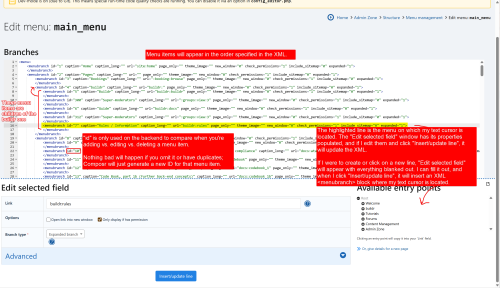
Instead, the menu editor will now be "magic XML". This may be intimidating for some of you who do not like working with XML. But I believe the benefits outweigh the learning curve, especially for menus with more than 10 or so items.
To make things easier, I'm keeping the menu editor window that previously popped up when you clicked inside a caption text box. But now, it will pop up whenever you click on a line in the XML for a menu item. And it will populate itself according to the data in the XML, allowing you to change the menu item's properties using the GUI editor if you prefer. It will also pop up (with blank options) when you click a blank line in the XML, allowing you to dynamically insert a new menu item into the XML with the GUI.
As for moving menu items, this is a matter of cut/pasting. Just cut the "<menubranch...></menubranch>" block you want to move, and paste it in the location you want it. Menu items will appear in the order you have them in the XML editor. You can also adjust menu branching in a similar way, though you have to be a little more careful about that.
I'll be rewriting the menu editor tutorial to cover all of this in-depth. And it will go live on composr.app when 11 beta9 is released so you can read up on it.
Here is a screenshot:
Telemetry settings change; Bayesian spam detection
Also coming in 11 beta9 are changes to telemetry settings and the start of a new Bayesian spam detection system.The telemetry setting will no longer be a dropdown list, but instead a series of tick boxes for each telemetry feature. If you tick one or more of them, telemetry will be enabled in general (your site will have a private key, and it will communicate with composr.app). And your site will communicate the data you elect to communicate. If all tick boxes are off, telemetry as a whole is disabled, and your private key for telemetry will be destroyed.
There are two reasons for this change:
- Fix confusion: The tick box for featuring your site did nothing (as intended) if telemetry is off, but intuitively, users might not think that.
- Better implementation: When new telemetry features are added, users have better control over what to enable.
Think of it as an Artificial Intelligence (but on a much smaller scale than Large Language Models). This is a new feature planned where your site will train itself off of the content on it; content 7 or more days old will be considered "ham" (not spam), and when you warn someone or delete any content, you have the option to flag it (train it) as "spam". And then a new spam heuristics option will allow you to include a prediction by the Bayesian algorithm in determining whether to mark for validation, block, or ban potential incoming spam.
Some things to keep in mind:
- This feature will be off by default. If you want to use it, then you will need to turn it on in your configuration.
- When upgrading from a previous version of the software, this feature will not be installed by default. You will also need to install it.
- The algorithm does not use any prior training data for ethical reasons (and because every site has different types of content), but this means it won't be effective until it has trained on some ham and spam data from your site. As such, the Bayesian algorithm won't actually start kicking in until it has a certain amount of training data (I haven't figured out the optimal value yet).
- I might implement the ability to use shared training data from the home site. If enabled, your site will instead send training data to this site (encrypted with your telemetry keys). And it will use the training data from the home site to make predictions. This increases accuracy as you will share the collective training data of other sites (and the home site itself).
- If you do *not* use shared training data from the home site, then your data is trained locally in your database. It is never sent anywhere or used anywhere else.
- Training data is hashed and salted for privacy reasons / GDPR compliance.
- Once content on your site reaches 7 days old, it is trained as ham (non-spam). We assume you will delete spam content within 7 days.
Feel free to ask any questions you may have about this or any other upcoming changes in this topic.
Last edit: by PDStig
Improvements to code overriding
Also coming to 11 beta9 are improvements to how Composr compiles code overrides.There was a fundamental problem with how Composr compiles overrides if a file contained both function and class overrides, or if a class contained static methods.
In version 11 beta9, a couple of coding standards were added:
- Composr files will not contain a mix of classes and functions anymore; files will only contain classes or only contain functions.
- Reason: to override a function, the custom file must be loaded before the original. The opposite is true for classes. Therefore, having both in the same file created conflicts.
- In some cases, I converted functions into static methods on the classes (e.g., a file contained only a few functions, and they all related to the classes defined in that file).
- All Composr-specific classes now follow a strict naming prefix scheme to ensure proper compilation when overriding parts of a class.
- Reason: This helps Composr properly compile classes, especially when overriding static methods or properties on a class.
For most people, these changes will not affect them. These changes mainly affect developers.
I've never been a fan of machines making direct moderation decisions. This is especially true with the spread of Artificial Intelligence. I see too many reports of people getting falsely punished for rules they didn't violate because computers falsely predicted their content as being in violation.
Therefore, spam confidence thresholds will now support a '0' value to disable them. The new defaults will be the following:
- Approval required confidence: 40 (left the same; this isn't direct moderation, and a human still gets involved in the process, so I think this is fine)
- Confidence to block submission: 0/disabled (I consider this a direct moderation action)
- Confidence to ban an IP: 0/disabled (I consider this a direct moderation action)
Current v11 sites and v10 sites upgrading to v11 will probably maintain their current settings. So if you want the new 'disabled' behaviour, then you will need to manually change it in your configuration after upgrading. These are for new sites.
Dropping PHP IMAP support
11 beta9 will also drop support for the PHP IMAP extension. Quite frankly, it is too unstable and yields weird behaviour. It is not properly maintained. And there have been discussions about sending it to PECL.Therefore, starting in 11 beta9, Composr will not use the PHP IMAP extension even if you have it enabled. Instead, it will use the Javanile IMAP library (bundled in Composr under the core_imap addon).
I made this change because the PHP IMAP extension is not correctly reading my SSL certificates for IMAP connections on composr.app. Switching to Javanile resolved the issue.
Please give a thank you to Javanile for developing this library, and consider making a small donation to them if you can.
https://github.com/javanile/php-imap2
This should not affect Composr in any way. IMAP features, such as bounce detection and support ticket mail integration, should still work (if not better than before). Additionally, those running on servers that do not support the PHP IMAP extension will benefit from Javanile as they can now use these features without it.
Entering testing phase
11 beta9 is now entering the testing phase. I appreciate everyone's patience with this version and the numerous obstacles I have faced in the process.Testing will likely take a long time because 11 beta9 is a major update to 11 beta8. I am hoping to release 11 beta9 in January. Of course, that is subject to change depending on how testing goes and if any life events interfere.
A release video will come with 11 beta9 explaining the major changes and important information.
Please give a thanks to Clue Hunting (cluehunting.com) for making this possible and funding me a bit so I can get this out.
Until then, everyone, have a great Holiday!
Making it easier to spot changed options after upgrade
See this:#6332 - Let people know of new options or options where the default value changed

Let people know of new options or options where the default value changed
I'm implementing a small, but helpful, feature that will help you spot new or updated configuration options after upgrading or installing new features. This will especially be useful for those upgrading from v10 to v11.
Testing phase delayed
I identified a couple of major issues in v11 beta9 that need to be fixed. Both privacy purging and statistics are triggering out-of-memory errors on sites with high traffic.Privacy purging must be fixed ASAP for GDPR compliance.
The statistics need to be in working order for 11 beta9, as a client depends on it (and is funding me to ensure it is working).
I apologize for the inconvenience. But I want to make sure these components are stable for beta9.
Rate limiting now requires SQLite3
Previously, Composr CMS would track hits for rate limiting in a file. This worked for small sites. However, the filesystem is notoriously slow. In my stress testing for composr.app (which currently receives up to 800K hits per day), it caused errors with not having enough available filesystem "slots" during high traffic.
I am moving to an SQLite3 solution. This is still a file. However, SQLite3 is vastly more efficient as it takes advantage of its own memory and journal.
Starting in 11.beta9, you will need the PHP sqlite3 extension to use Composr's rate limiting. Over 95% of PHP servers today have this extension available, and even enabled, by default (you may have to enable it if you run a Windows server).
We still highly recommend that you use server-side rate limiting instead of Composr's rate limiting, if possible. That will prevent excess traffic from even reaching Composr at all; Composr still has to boot up its core systems to run its rate limit checking.


