

Changes in the top panel from ocp
Posted
#1563
(In Topic #363)

Posted

Chip McCain (2) said
One thing I noticed right away is the Composr out of the box uses auto-generated menus. Next thig I'm seeing is in what used to be the top panel in ocp, is there's a log in box, which I'm assuming is connected to the personal block. Either way, I've not been able to find where to edit this in Composr. I don't need my visitor logging in, or seeing a log in box, or asking them to join etc. I'd like to remove that from the top panel and only show the personal block to our staff when they're logged in. I've looked in the block and panel manager but am not seeing it, and I even looked in the pages/comcode_custom/en directory and don't see a top panel.txt file there either. What am I missing please?
From “user log-in problems”, 2nd Jan 2017
I dont know, but I will go have a look on mine and see if I can help you, i hate stopping Chris from coding lol.
Posted
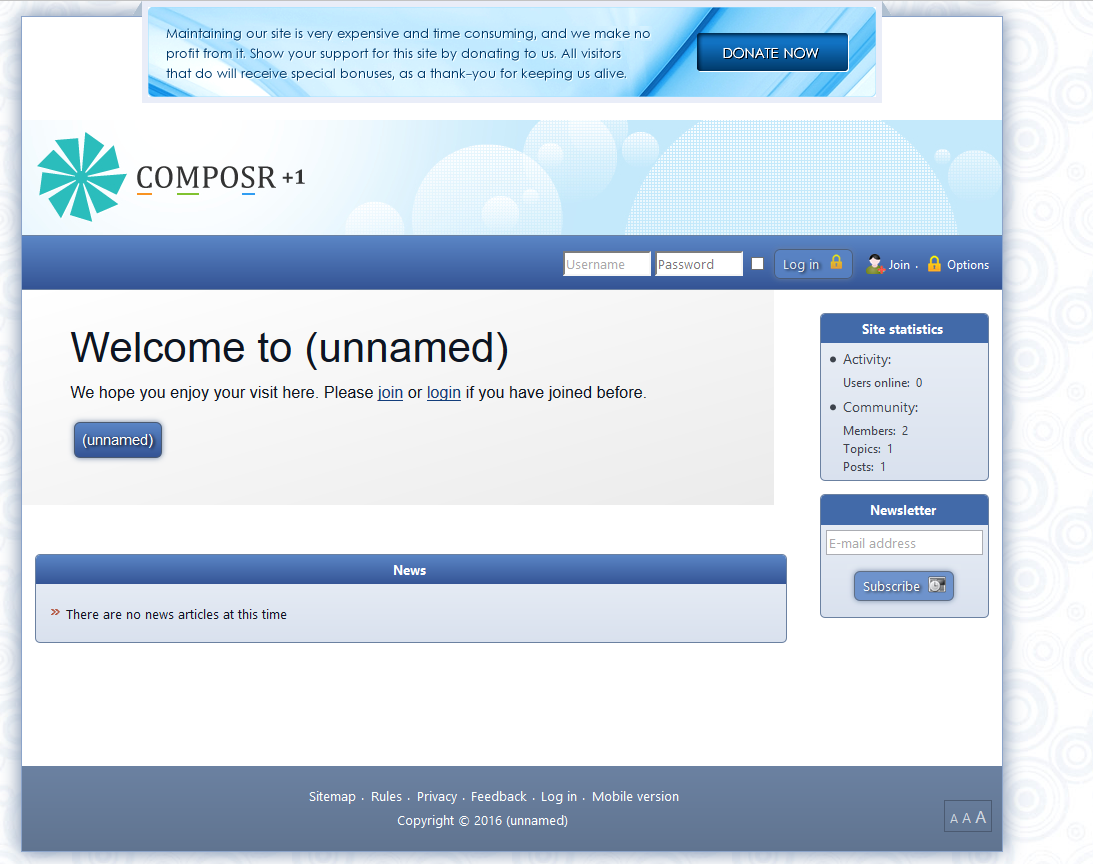
And you want to get rid of the top sign in box and register bit, is that correct? Also do you want to keep the bottom footer login for staff?
Posted
Posted


Moderator


Posted
Moderator
What I'll do is I'll add options to toggle them for the next RC. That's a reasonable compromise I think.
Posted
I assumed Chip just wanted to get rid of the log in box at the top except for staff, this can be done via menues and other options cant it?
Most blocks have an option not to display to guests, and also other user groups. He could have a page or leave the link for staff on the footer that just says login.
I am so sorry but i am really not explaining this well…
What i am trying to say is he can change the main page, even if its a server redirect to another page, then have the login bit on the footer left for staff or removed. I also think there is an addon that allows password protected pages, so if he moves the login page and protects it, he can get staff to register that way or Admin panel, then just set the personal box as viewable by upper user groups.
If some one can make head or tail of what i am talking about, and if this is what Chip wants. then i can do it by screen shot (easier for me), then do a written description based on my screen shots?
Have i made any sense?
If chip can wait a couple of days i can do something like this as a template and post it for him. But in essence i did this recently in a test, i didnt need to edit any HTML or templates, i simply moved a few things around and used the password protection for the main page i moved. I could then give staff (in my case teachers) the password in an email to the register page.
Man i made a mess of explaining that.
I am going to add this to my list of tutorials for beginners and seeing as Chip is blind i assume he uses a screen reader?
It might be easier if i do a video with voice and describe the short cut keys and the process as i do it. Whatever is easiest for Chip.
I understand what you have said Chris, and obviously you know the software inside out, but i am positive i have done something similar by cheating if you like.
Or i may have totally misunderstood Chip and you understand the question better than i do??
Ok i will shut up now
 .
.It would be really good to know what works best for Chip, when it comes to being instructions. Other people with sight problem will likely use the same methods, so if he uses a automated screen reader, then when i do tutorials i can do a version thats highly descriptive in text as well.
LG.
Posted
Directory Protect

Protect the files in a directory by routing requests through a Composr script. Composr will search for the page containing the linked content and only grant access if the current user has access to that page. Developers could customise the code to apply different permission rules. You will need to add a new rule into your .htaccess file to control the routing. Assuming all the files were under a 'videos' directory: RewriteRule ^(videos/.*)$ data_custom/directory_protect.php?file=$1 [L,QSA] Put the rule above this part of the Composr default: # Anything that would point to a real file sho…
Then for the stats blocks it was just a case of permissions. Knowing me i probably hid the footer login under a footer graphic and gave the graphic a higher Z number, not elegant but i was learning at the time

Posted
Moderator
I assumed Chip just wanted to get rid of the log in box at the top except for staff, this can be done via menues and other options cant it?
Nope, currently only via a template edit.
It's coded into GLOBAL_HTML_WRAP.tpl with this code:
Code
			   <div class="global_navigation_inner">
      {$,Login form for guests}
      {+START,IF,{$IS_GUEST}}
         <div class="top_form">
            {$BLOCK,block=top_login}
         </div>
      {+END}

      {$,Search box for logged in users [could show to guests, except space is lacking]}
      {+START,IF,{$AND,{$ADDON_INSTALLED,search},{$NOT,{$MOBILE}},{$NOT,{$IS_GUEST}}}}
         <div class="top_form">
            {$BLOCK,block=top_search,failsafe=1}
         </div>
      {+END}

      {+START,IF,{$NOT,{$IS_GUEST}}}
         <div class="top_buttons">
            {$BLOCK,block=top_notifications}

            {$BLOCK,block=top_personal_stats}
         </div>
      {+END}
   </div>
Most blocks have an option not to display to guests, and also other user groups.
Actually not as a part of the block itself, only as code around the block. So that would still be a template edit.
But right I'll essentially by adding code around the blocks in the template that makes it respects the new options I'll add. It's only going to take me a few minutes
 .
.I am going to add this to my list of tutorials for beginners and seeing as Chip is blind i assume he uses a screen reader?
That's right.
Posted
Moderator
For the curious, as this is a nice little programming example:
https://github.com/ocproducts/composr/commit/ef827df64144ed417d276ebb88c6602c16d802d1
Posted
Posted
Moderator
.
Posted
Posted
Chip McCain (2) said
Sorry LG11, I'm totally blind and so I can't see what's in your screen capture. However, thanks guys. I thought, after looking around a good bit, that it must be in one of the template files, but hadn't found it. Thanks Chris for pointing out where it's at. I've got our site setup for a information / gallery type site and as such won't need members other than my self and my wife, so didn't want to confuse people by having a join and log in section at the top. I had originally thought I'd use the top menu bar as my main nav section, but since I couldn't find it as a panel just created a new menu that I've placed in my left side bar. That would be nice to be able to turn it off in the next RC, but I also know you guys have your hand full.. I'll give a shot at playing around with it and see what I can do without messing up the layout too much. I really appreciate all the help.
From “Post #1542”, 2nd Jan 2017
Thats ok chip, i misunderstood what you wanted anyway.
I am a noob at this. Its good to know that people who have visual problems use the site and software. It will help me think through things more clearly, at least when i am trying to explain something.
Chris I am snowed for two days, i will get the V11 branch downloaded as soon as i can, and test it. Things have gone a little manic here.
Posted
Chris Graham said
Done. Added as Theme Options.
For the curious, as this is a nice little programming example:
https://github.com/ocproducts/composr/commit/ef827df64144ed417d276ebb88c6602c16d802d1
From “Post #1540”, 2nd Jan 2017
That is absolutely perfect! Thanks so much.
0 guests and 0 members have recently viewed this.



