

#1392 - Adding images from Photobucket, Flickr and Perhaps Facebook
Posted


Moderator


Comment: #catalogue_entry_1853
Whoops, it should work now. The syndication options weren't getting added to the dynamically added extra upload field(s).
Posted
I would like one more usability feature please - happy to pay for it mate.
Clicking upload on an attachment causes another window to pop up - there is no reason to have this extra annoyance for most users. All they would want is for the full size image to be embedded directly.
So can it be modded so that if the image is ticked to be syndicated to photo bucket then the second pop up does not show and it simply gets rendered as not a thumbnail and enbedded directly ?
Cheers
Ade
Posted
Moderator
Posted
The option to load more than one image at a time has disappeared.
It lets you do one no problem, but then it use to add a second box - that has now gone away - any idea ?
Cheers
Ade
Posted
I am getting several users reporting that they cannot upload images.
See this thread:
http://vwgolfmk1.org.uk/forum/index.php?page=topicview&id=meets-events-and%2Fwas-it-you_2%2Fimmaculate-white-cabby&kfs84=30
What cannot work out is whether this is a photobucket problem or an integration problem, can someone take a look please.
Cheers
Ade
Posted
So I have investigated a little further.
I also get an error if I su as the same user that cannot upload - the error is different and talks about there are already too many attachments uploaded.
The users that are complaining are in the "Newbie" user group - this lead me to look at the number of attachments that they are allowed to upload, this is set as zero, so i changed it to 10 and they can now upload. I tried it both as su and the user tried as themselves - so all good.
However the other Primary Usergroups all have the upload number set to zero as well - I have changed all of them to 10 now though.
I wonder if something else is over riding the quota for the other groups ?
Cheers
Ade
Posted
Moderator
We will make a usability change for v10 where no attachment upload is offered if the attachment number is zero. i.e. we'll give that case special handling in the UI.
I don't think I see a bug here, but rather Composr is not communicating the limits well.
Posted
Some users are still getting this error. Not always newbies either
Take this post for example
http://vwgolfmk1.org.uk/forum/index.php?page=topicview&id=chat%2Fgeneral-chat_3%2Fwhat-are-these-wheels_10
Not sure where to look - can you help
Cheers
Ade
Posted
Moderator
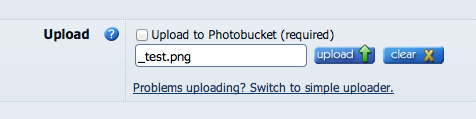
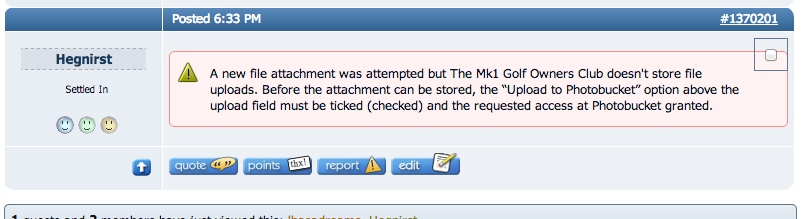
I was able to get photobucket working fine. However, if I ignored the photobucket activation, I did get a zero quota error. I'll see if I can make that error more explicit, perhaps reference photobucket.

Posted
There may be a clue there.
When I ask posters to post again it seems to work ok for them - so maybe it is just a time delay between Photobucket setting up and allowing uploads ?
The majority of the moaning stopped once I lifted the quota to 10, so I think that this is an edge case.
Cheers
Ade
Posted
http://vwgolfmk1.org.uk/forum/index.php?page=topicview&id=newbies_2%2Ftest
Posted
Moderator
I suspect they were just reading more carefully that the Photobucket checkbox had "required" next to it, or realising they had to click through to provide auth rather than just closing the overlay right away. I don't think there's a delay in the process because the auth is approving a key already known to Composr when the auth happens. The key is generated, then the UI is to approve that key.
"Just spotted another user experiencing the same"
This was me ;-). I was testing as the same user you reported above.
I have attached a screenshot of how the zero quota message now looks - as you can see, it clearly explains Photobucket.
0 guests and 0 members have recently viewed this.


