

V10 - Member directory search
Posted
#8688
(In Topic #2172)



Posted



Core Developer


Also, open developer tools in your browser and see if any JavaScript errors get logged when you try to search.
I'd also like to know specifically what you tried to do. What did you type and in which boxes? Did you then hit the enter key or did you click filter?
 Last edit: by PDStig
Posted
I am on 10.0.52.
Whether I (as an admin), or if any member enters any one of a username, usergroup, or location in their respective field, and click the "Filter" button (or hit enter), the list does not change and remains the same, no page reload. I very briefly see what appears to be a "working" icon.
The default initial sort order for the list is by join date. If I reload the page, it returns to the site's main page.
We can change sort order, and use the page function at the bottom without any issues. Only the search function seems to be affected.
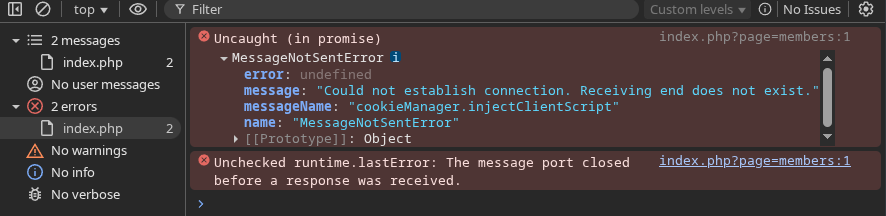
I think this is what you are looking for? (I had to learn something new.
 )
)
Posted
Core Developer
Yes that's what I'm looking for. However try having it opened first, then refresh the members page with dev tools left open, and do a search keeping it open. And show me what comes up. I'm not sure those errors are relevant (they might be, but it's not giving me enough info).
Posted
I tried several different ways to reproduce the top error, but without any success.
The "Search content" is page working without issue.
I have to be up in 4 hours, so I'll check back in later.
0 guests and 0 members have recently viewed this.

