

[HowTo] Set Conversr Forums as Home Page!

A little tip for those who want the forums as their site home.
Composr is a heavily flexible CMS that if you have the know how and take the time to learn how Composr does things, you can really make your site however you want it. For me, my site is meant to be centered around a wiki and forums. I don't make much use of the default homepage and would much rather have the diverse and always lively forums be the first thing visitors to my site see.Composr makes this easy using a secret weapon called Redirects. With Redirects, you can set any page as your home page. Of course, it doesn't stop there. You can even use the power of Redirects and Virtual Roots to make each forum act like its own set of forums and have its own page on your site. I did this long ago as a test, and it blew me away.
Anyway I'm getting off topic. Here I'll show you how to do the one thing that community makers often seem to like doing (or maybe its just me?). That is, I will show you how to make your forums be your home page. This will work seemlessly so that even clicking on forum home in the breadcrumbs will put you back on the home page. All it requires is two little redirects.
Code
Welcome:start -> Forums:forumview to make forums be the default home page.

Forums:forumview -> Welcome:start to make forums be the default home page. (not transparent)
The first one is what makes your forums be your homepage. The second one makes it more transparent so that clicking on "Forum home" in the breadcrumbs will take you to your homepage instead of the forumview page. Using both keeps it all nice and tidy as far as URL's are concerned so that your members and visitors will be less confused.
Here's how to set them.
In your admin zone, go to Structure. Then go to Redirects.
Once in your Redirects page, go to the bottom. You will see something like this….
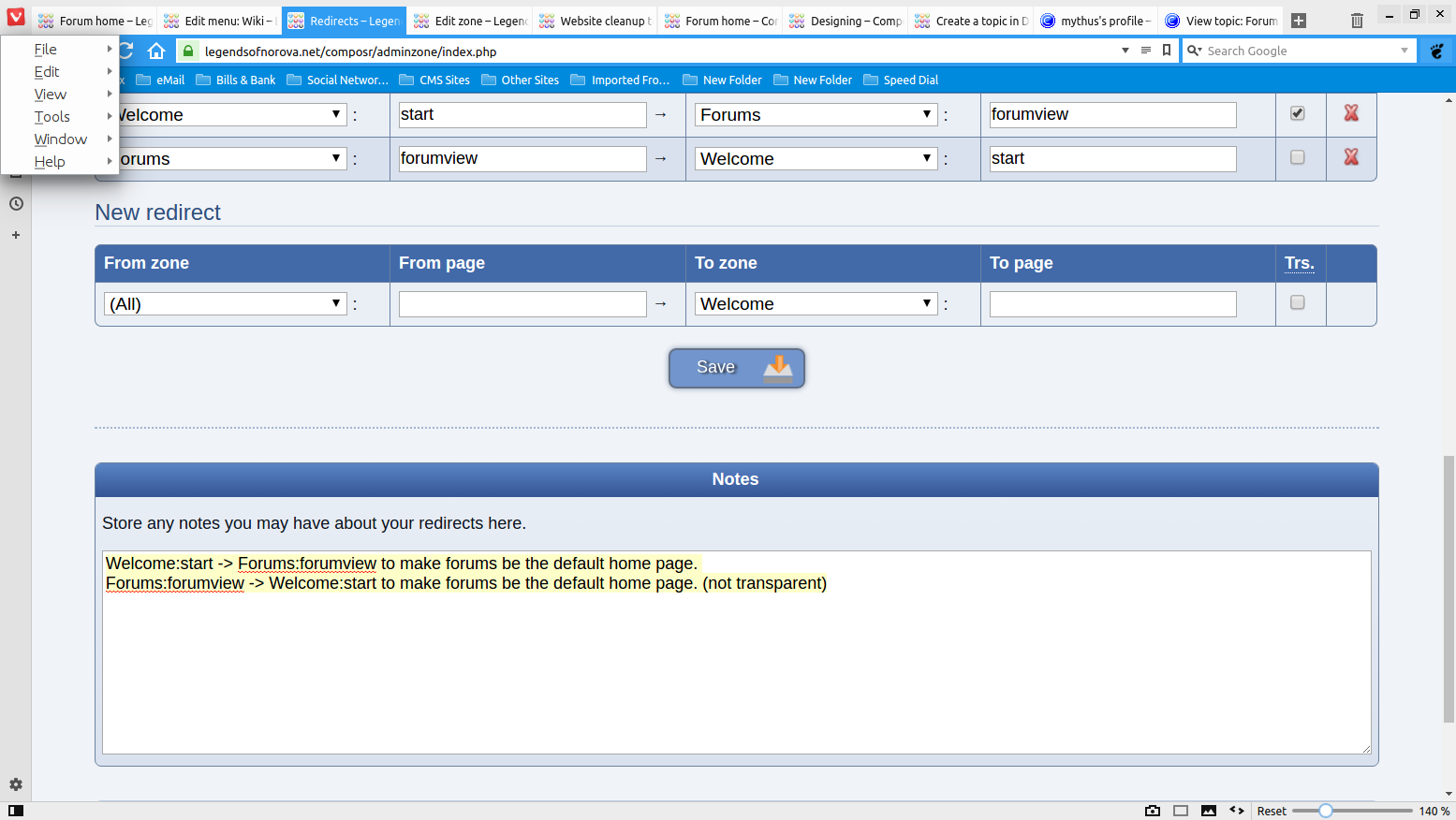
The fields are From Zone, From Page, To Zone, To Page, and Trs which stands for transparent. Type the following in each field:
From Zone: Welcome
From Page: start
To Zone: Forums
To Page: forumview
Trs: check
Then hit save. Now go back to the bottom and type in the following in each field:
From Zone: Forums
From Page: forumview
To Zone: Welcome
To Page: start
Trs: leave blank
You need to leave Trs blank otherwise it will spit out an error about a missing page should you click on "Forum home" in the breadcrumbs.
What is happening is the redirects are telling the site to use the forumview page as your home page, but do not rewrite the URL to show the forumview page (that is what the Trs transparent is all about). It also is telling the site that if you click on Forum home you mean to go home and to update the URL to the home url. Since home is already set to forumview page but the home url is simply your website address, this means your home page will be the forumview page with your default url.


Moderator


 .
.
0 guests and 0 members have recently viewed this.



