Howto: Numbers on notification buttons






Core Developer


In this tutorial, I'll explain how you can get red numbers on the top notification buttons to indicate number of unread notifications
Screenshot of this in action: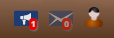
Difficulty: 2/5
Pros: This will allow your users to know how many unread notifications they have via. a red number bubble on the notification buttons, similar to Facebook.
Cons: The number will still display even if there are 0 unread notifications. However, like the notification button, it will be displayed at 0.5 opacity if there are no notifications.
Step 1. Go to your Admin Zone, and Style -> Themes. You will want to repeat all these steps for each theme you wish to apply this effect to. To apply it to all themes and every theme made via. the theme wizard in the future, apply the effect to the default theme (I do not take liability for anything that happens as a result of editing your default theme!).
Step 2. Edit CSS. Choose "notifications.css" to edit.
Step 3.
ADD at the top
Code
			#noti_Container {
    position:relative;
    width:16px;
    height:16px;
}
.noti_bubble {
    position:absolute;
    top: -6px;
    right:-9px;
    padding:1px 2px 1px 2px;
    background-color:red;
    color:white;
    font-weight:bold;
    font-size:0.55em;


    border-radius:30px;
    box-shadow:1px 1px 1px gray;
}
(Edit the above CSS code to your taste now or in the future to style your notification number bubbles)
Step 4. Save the CSS.
Step 5. Edit the theme's templates. Edit BLOCK_TOP_NOTIFICATIONS.tpl .
Step 6.
FIND
Code
<a title="{!notifications:NOTIFICATIONS}" id="web_notifications_button" class="leave_native_tooltip count_{NUM_UNREAD_WEB_NOTIFICATIONS%}" onclick="return toggle_web_notifications(event);" href="{$PAGE_LINK*,_SEARCH:notifications:browse}"><span aria-label="{!COUNT_TOTAL} {!notifications:NOTIFICATIONS}">{NUM_UNREAD_WEB_NOTIFICATIONS*}</span></a>
REPLACE WITH
Code
<a title="{!notifications:NOTIFICATIONS}" id="web_notifications_button" class="leave_native_tooltip count_{NUM_UNREAD_WEB_NOTIFICATIONS%}" onclick="return toggle_web_notifications(event);" href="{$PAGE_LINK*,_SEARCH:notifications:browse}"><span aria-label="{!COUNT_TOTAL} {!notifications:NOTIFICATIONS}">{NUM_UNREAD_WEB_NOTIFICATIONS*}</span>
<div id="noti_Container">
<div class="noti_bubble">{NUM_UNREAD_WEB_NOTIFICATIONS*}</div>
</div>
</a>
FIND
Code
<a title="{!cns:PRIVATE_TOPICS}" id="pts_button" class="leave_native_tooltip count_{NUM_UNREAD_PTS%}" onclick="return toggle_pts(event);" href="{$PAGE_LINK*,_SEARCH:members:view#tab__pts}"><span aria-label="{!COUNT_TOTAL} {!cns:PRIVATE_TOPICS}">{NUM_UNREAD_PTS*}</span></a>
REPLACE with
Code
<a title="{!cns:PRIVATE_TOPICS}" id="pts_button" class="leave_native_tooltip count_{NUM_UNREAD_PTS%}" onclick="return toggle_pts(event);" href="{$PAGE_LINK*,_SEARCH:members:view#tab__pts}"><span aria-label="{!COUNT_TOTAL} {!cns:PRIVATE_TOPICS}">{NUM_UNREAD_PTS*}</span>
<div id="noti_Container">
<div class="noti_bubble">{NUM_UNREAD_PTS*}</div>
</div>
</a>
Step 11. Clear template and css caches.
Enjoy!
 Last edit: by PDStig
Posted
Core Developer
0 guests and 0 members have recently viewed this.