cns_special_cpf
Posted
#7013
(In Topic #1708)

Trying to change "Google+" to "MeWe"
I don't know if this is a bug, or if I am just not connecting certain dots...While editing my profile on my website, I noticed that the contact option "Google+" was listed. Seeing as how Google+ has been dead since 2019 I figured I would change Google+ on my site to a different social site. In my case I chose to use MeWe. I searched the backend and found two entries in a page called cns_special_cpf. In both cases I changed "Google+" to "MeWe" and then saved.
I expected the changes to be reflected on the frontend of the site, but they weren't. I verified the file saved and the changes are shown on the cns_special_cpf page but I have no clue as to why those changes are not being reflected on the site. Also, now when I search "Google+" it predictably has no search results however, there are also no results for "MeWe". I re-verified and the changes are still present.
Any ideas as to why this is not working as expected and how to correct it?
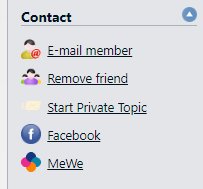
As a side note, I entered my MeWe profile link in the Google+ field but it doesn't show up in the "Contact" section like my Facebook profile link does. Instead, it appears farther down the page in the "About" section, and it isn't a clickable link but rather it is the full link address in plain text.
Is this a connected issue or something else?
Posted



I was hoping to be able to offer you a quick fix-up but it appears you've stumbled on to weirdness here so I'll have to defer to Chris & Co. for a solution.
I can confirm your experience as I recreated your steps and had the same result. The lang_custom file appears to be modified correctly but Composr is not reading it for some reason.
One thing further: I changed the entry 'Google+' in the database table cms_f_custom_fields (row 8 in my installation) to MeWe which in turn was immediately reflected in the edit portion of the profile section but the entry completely disappeared from the About section as a result. When I switched it back to Google+, the entry reappeared in the About page but as Google+ again and not MeWe.
Sorry I couldn't help further!
SD


Moderator


It sounds like you edited the language string, but you need to edit the CPF the text already copied to at installation.
This is in Admin Zone > Tools > Members > Custom Profile Fields.
It should be easier to find this so I created an issue (0004711: Allow admin search to find CPFs - Composr CMS feature tracker).
As for the display of the CPF, by default any CPF will just show as a field in the About section. The CNS_MEMBER_PROFILE_ABOUT template has a load of code to override that. It's a bit of a jumble TBH because there is nothing in the core system to differentiate different kinds of fields, it's all up to the template to determine that.
I think replacing all {!cns_special_cpf:DEFAULT_CPF_sn_google_NAME} with MeWe and Google+ with MeWe also would do that.
Posted
Chris Graham said
As for the display of the CPF, by default any CPF will just show as a field in the About section. The CNS_MEMBER_PROFILE_ABOUT template has a load of code to override that. It's a bit of a jumble TBH because there is nothing in the core system to differentiate different kinds of fields, it's all up to the template to determine that.
From “Post #8290”, 27th Aug 2024
Thank you both for the information. I'll check into it at my next opportunity.
As for what you said above Chris, based on what you said I imagine that it would be a substantial undertaking to update the core code.
 As it stands, adding additional contact info delivers unexpected results and thus the confusion and second question I had.
May I suggest an update (at some point) to this specific area so that it performs more in an expected manner without having to dive into the code? Some suggestions:
- When adding contact info, it shows up in the contact area.
- A simple way to add new contact area fields and associated logo's.
- I'm not sure this one is even feasable, but a simple way for site owners to change (or disable) pre-existing contact sites that go defunked, such as Google+.
 Last edit: by Keith Parker
Moderator
v11 will have a concept of CPFs being in sections.
v11 will also have a large selection of bundled CPFs you can easily turn on, for most common social networks and instant messengers. They are all easy to toggle.
Posted
Chris Graham said
It sounds like you edited the language string, but you need to edit the CPF the text already copied to at installation.
This is in Admin Zone > Tools > Members > Custom Profile Fields.
The CNS_MEMBER_PROFILE_ABOUT template has a load of code to override that.
I think replacing all {!cns_special_cpf:DEFAULT_CPF_sn_google_NAME} with MeWe and Google+ with MeWe also would do that.
From “Post #8290”, 27th Aug 2024
Your suggestions worked perfectly. Thank you!
I edited the CPF, and then I also edited CNS_MEMBER_PROFILE_ABOUT. Because I am concerned with causing a major foobar, I didn't touch any internal codes (eg: DEFAULT_CPF_sn_google_NAME) however, I did change text values that said "Google+" to "MeWe". Everything looks as it should on the frontend of the site. I also added my own custom square logo because they don't have one.
So in the CNS_MEMBER_PROFILE_ABOUT template file I added target="_blank" to the appropriate areas and that solved the problem.
Posted
Moderator
3 guests and 0 members have recently viewed this.