adding Firstname and Lastname to the Profile details display
Posted
#6368
(In Topic #1399)


Thanks in advance for your help!
Best,
Christopher



Moderator


Browse to Admin Zone→ Setup→ Configuration→ User/usergroup options and enable the first and last name Special CPF's. Then scroll down a bit and add the ID's for those fields into the Display name generator. On my install first name is 35 and last name is 36 so these are the ID's I would need to use. You can check the ID's on your install at Admin Zone→ Tools→ Members→ Custom Profile Fields by selecting edit and viewing the existing field ID's.

Moderator

I don't think you need to do the display name bit if you just want them showing individually on your profile.
Edit: I just tested it. Users with the shopping cart addon installed (i.e. a default install which has that) don't need to enable it, but otherwise you do need to enable the checkbox. Otherwise you can't even edit that CPF. The way Composr works in this regard is there are various bundled standardised CPFs, but they only get enabled if something installed needs them or sometimes there's a checkbox to manually unmask them to make them show.
 Last edit: by Chris Graham
Posted
Moderator

Posted
Adam said
Hi,
Browse to Admin Zone→ Setup→ Configuration→ User/usergroup options and enable the first and last name Special CPF's. Then scroll down a bit and add the ID's for those fields into the Display name generator. On my install first name is 35 and last name is 36 so these are the ID's I would need to use. You can check the ID's on your install at Admin Zone→ Tools→ Members→ Custom Profile Fields by selecting edit and viewing the existing field ID's.
From “Hacking”, 29th May 2022
Thanks Adam! I actually already have the CPF's enabled for Firstname and Lastname. I saw the 'Display name generator' field but didn't know how to find the field ID's. So thanks for that tip! Unfortunately, when I go to Custom Profile Fields and select edit to find the field ID, I'm not seeing it. Here is a screenshot of what I am seeing:
I don't think the Order field is the FieldID, but I'm not seeing FieldID anywhere. This screenshot is for FirstName.
Thoughts?
Posted
Chris Graham said
Adam gave a good answer. They are masked out by default until that config checkbox is enabled.
I don't think you need to do the display name bit if you just want them showing individually on your profile.
Edit: I just tested it. Users with the shopping cart addon installed (i.e. a default install which has that) don't need to enable it, but otherwise you do need to enable the checkbox. Otherwise you can't even edit that CPF. The way Composr works in this regard is there are various bundled standardised CPFs, but they only get enabled if something installed needs them or sometimes there's a checkbox to manually unmask them to make them show.
From “Post #7212”, 10th Jun 2022
Thanks Chris. I do want to show individually on my profile…and to do so you do need to edit the CPF and enable Owner Viewable and Publicly Viewable (which both were not set). Adam's response pointed me in the right direction

Please see my previous response to Adam's post as I am having trouble finding the field ID's in order to take advantage of the Display name generator.
Posted
Moderator
Posted
Chris Graham said
It's in the URL (address bar) of the edit screen.
From “Post #7217”, 16th Jun 2022
Thanks Chris. I suspected that and therefore I looked, and this is what I saw:
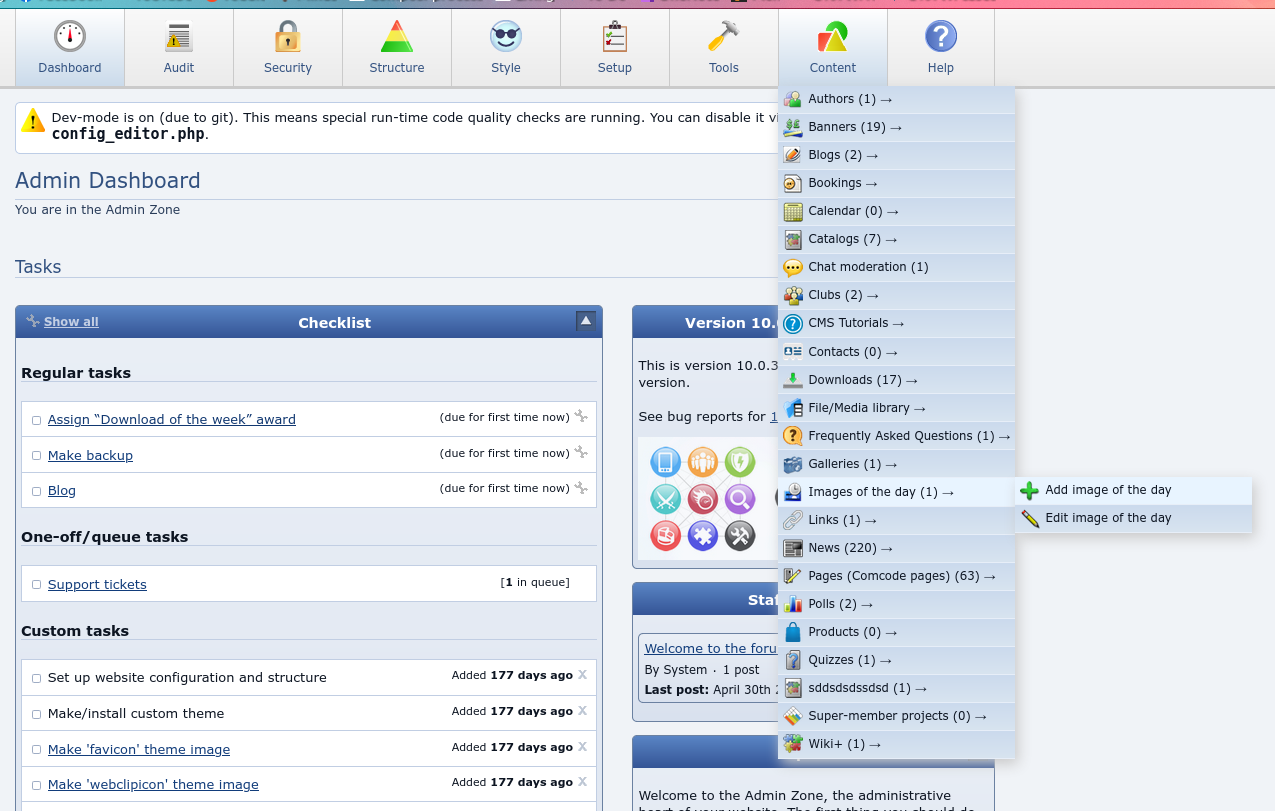
However, for other folks that may not have thought to 'click inside the address bar', or perhaps this is specific behavior to certain browsers (I'm using Chrome) — you may need to click inside the address bar in order to see the full URL:
Posted
Moderator
Adam said
I think the Order ID is the Field ID. I've never checked the URL for it, always check the CPF edit screen and use the Order ID (which I thought was called Field ID so sorry for the confusion).
From “Post #7222”, 16th Jun 2022
Actually it turns out the Field ID is what is specified in the address bar. The Order ID appears to be something else. I did try the Order ID initially thinking the same as you, that perhaps the Order ID is the Field ID but when saving and going to my home page the username appeared as "{24} {25}"…so definitely wasn't working. Once I switched to the Field ID as specified in the address bar it did work
Thanks again for the help!
0 guests and 0 members have recently viewed this.