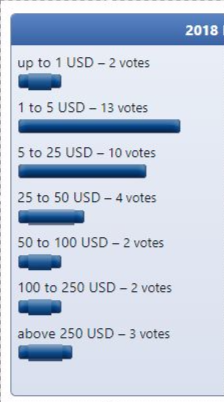
Google Chrome poll bar display




Moderator


Can you check a couple of things for me 1st…
- Is this Windows?
- Are you zoomed in or out (if you are then View->Actual Size on the Chrome menu will allow you to reset)
Windows. Zoom is 100%.
Moderator
I can't reproduce, but try this, I think it will fix it:
Attachment
themes/default/templates/POLL_ANSWER_RESULT.tpl
Unfortunately it did not. Thank you very much for trying though.
Moderator
I'm not sure then. Maybe some display driver bug. The poll bar consists of 3 images - left, right, middle - and each is given 15 pixels height.
You could try emptying your block cache though.
You could try emptying your block cache though.
Yup 3 parts to a bar. It only happens to the short ones for some reason.
Is there a way to have the poll box displayed total number of votes?
Is there a way to have the poll box displayed total number of votes?
Moderator
I think you mean total for all options combined.
It is possible, but it would require writing some Tempcode to tally it up, as there's no parameter right now for it.
I've added a tracker issue which maybe we can cover in a live chat if it gets enough votes 0003444: Pass in total votes to POLL_BOX template - Composr CMS feature tracker
It is possible, but it would require writing some Tempcode to tally it up, as there's no parameter right now for it.
I've added a tracker issue which maybe we can cover in a live chat if it gets enough votes 0003444: Pass in total votes to POLL_BOX template - Composr CMS feature tracker
Thank you
0 guests and 0 members have recently viewed this.