After a recent upgrade a few times ago suddenly all my other new zones started showing the background and some behavior from my original zone.... I did not report it as I assumed it was some problem I created myself.
Today, on a different website and a different server the same problem happened , for example:4
you can see the new color scheme etc but i am unable to change the background. the photo image slide show is adopting the css from the original zone rather than behave with stock CSS.
I checked the "restaurant" global wrap and CSS and its all fresh and not modified. So somehow CSS qualities from the orginal zone are being combined...
my mind is tired and boogeled so wanted to check in and report this issue and see if it is something I messed up or not.
you can see the new color scheme etc but i am unable to change the background
Are you sure you edited the 'outer_background' theme image separately for each theme? If you have overridden it only over what is in the default theme, rather than individually for each theme, it's going to be the same image.
the photo image slide show is adopting the css from the original zone rather than behave with stock CSS.
Not sure what you mean by the two zones combining your CSS - looking at your site, I noticed even though it's the same background image, it is in fact shown differently on your new zone.
For example, body#main_website is different on each theme. The normal theme (not the restaurant one) defines other background properties that are not defined in your restaurant theme. This is why the background appears differently.
I created a new theme (copy of default) for futurecode.jp & restaurant.
Yeppers I edited the 'outer_background' theme image separately for each theme
I upload a different image and it is there in the editor, but after flushing cache on the cms and browser the new zone always keeps the first zone image…..
Joe mentioned double bits of CSS, it kinda is like the new zone and the previous zone CSS are merging somehow
i checked the CSS in the new zone (in theme editor) and none of my edits are there
or perhaps the new zone is loading the new zone theme but loading the old zone CSS
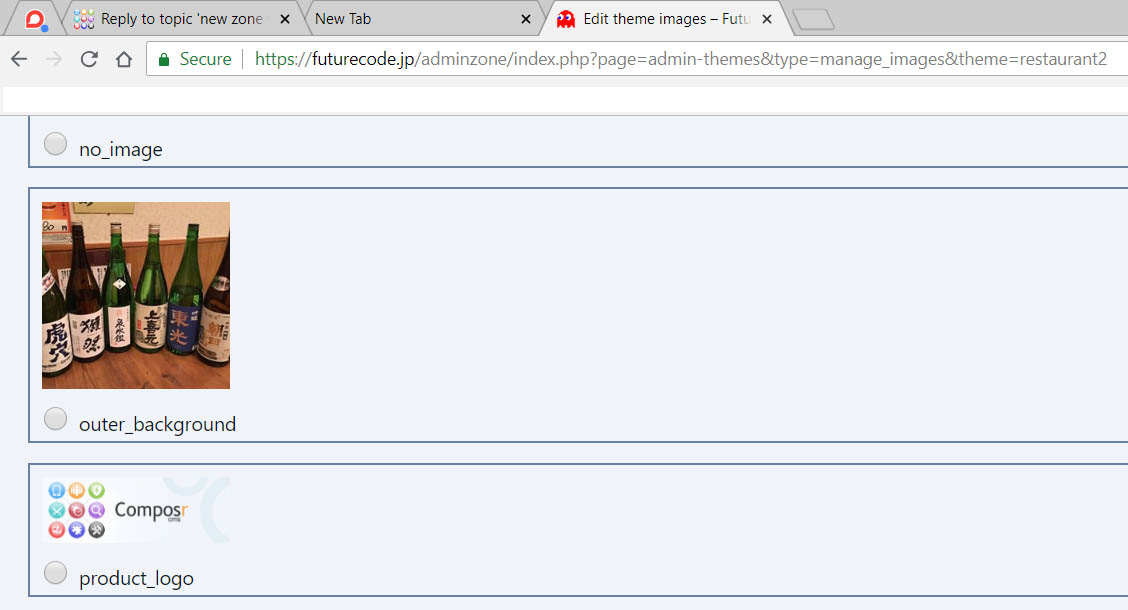
enclosed is image of the new restaurant zone with some sake bottles as background. It displays OK in theme editor but not on restaurant page.
So this same exact issue is happening on the other website on a different server. It has many different zones each with different CSS, backgrounds, etc and it was all working great but upon an upgrade it now has same problem, alll the various zones all now display CSS & background image of the original zone.
Thank you, I will apply the fix now and also investigate and report back
Are you 100% sure the zones are set to use different themes? You can check this in Adminzone -> Structure -> Zones -> Edit Zone. Ensure the 'theme' fields are set accordingly. Maybe they somehow reverted themselves after you upgraded?
I know you said it's not showing your edits in the new zone's CSS, but maybe a temporary fix could be to bypass the theme image editor and apply your background image directly inside the CSS? Or at least until Chris can figure this out.
Name Title Default page Theme Require confirmed session Actions
N/A Welcome start Future_Code No Edit
adminzone Admin Zone start admin Yes Edit
cms Content Management cms admin Yes Edit
restaurant Restaurant start restaurant2 No Edit
copy of my zone setup, so main uses future_code and restaurant uses restaurant2 theme
I agree, I will just hardcode the new background into the restaurant theme CSS so I can continue working on it (showing it to the restaurant tomorrow) so its OK but this seems to a bug or something I messed up on my end.
update: i should mention that i created a new test gallery in the restaurant and now it is using the proper box css for the restaurant theme but not the color. so weird
i tried the hotfixes again but no luck. did not change behavior of the deferred imade fader and actually interfered with custom image fader CSS on original zone so switched back to standard
since my site is primitive and new i may try and do a fresh install and start over as a test and see if same issues
I edited the 'outer_background' theme image separately for each theme. I upload a different image and it is there in the editor, but after flushing cache on the cms and browser the new zone always keeps the first zone image…..
I know you said you emptied the cache, but I did just find a bug where editing a theme image did not correctly clear the part of the template cache containing the global.css files. Maybe that will help avoid some possible confusion, especially when you've found multiple bugs unfortunately.
Joe mentioned double bits of CSS, it kinda is like the new zone and the previous zone CSS are merging somehow
The deferred block will cause CSS to double evaluate, as the block will load the CSS not knowing it's already loaded. It should be the correct CSS file in both instances though, so it shouldn't create a problem albeit it will be messy to see in the browser debug tools.
I did just find a bug whereby the keep_theme URL parameter was not being evaluated correctly, which may have also caused an issue somewhere. This did come up very recently, caused by a different bug fix.
i checked the CSS in the new zone (in theme editor) and none of my edits are there. or perhaps the new zone is loading the new zone theme but loading the old zone CSS
Hmm, maybe it's the issue Joe just had in https://compo.sr/forum/topicview/browse/deploying/custom-css-js-files.htm, if you happened to be using the template editor rather than the CSS editor to edit the file. I just tested editing as CSS, as a template, and as CSS using the screen action tool in the footer - all worked.
I also have fixed blank image titles copying through, it should stay to the last title set, or 'Media'.
I have also fixed an issue with IMG_INLINE not working correctly for overridden theme images.
Sorry for the big pile of issues!
If you are still having issues (you said your last hotfix application did not work, perhaps an incompatibility), please consider e-mailing me with FTP access and I'll make sure it does work for you.
Attachment
hotfix2.tar
The hotfix incorporates changes in the previous one, and the fix for Joe's issue I referenced.
Hello, I have decided to do a fresh install and make a record of how I install and everything I do as well as any problems that may occur. Will share when done.
I expect to be in the IRC room from roughly 1pm UK time to 4am UK time on Friday (i.e. today but I haven't gone to sleep yet) - so if you want you can try and catch me there. (There'll be a few hours here and there where I'll be gone.)





 Last edit: by ironfeather


